This is AI generated Response.
Asked by: Test User 100081
Created at: 2025-05-07 06:13:44
Final Answer:
RenderedRaw Text
Did you like this answer?
Absolutely! Let’s break your task into clear, well-explained steps, as you requested.
---
## **STEP 1: Introduction to the Concept**
**Concept:**
You are required to process a CSV dataset with possible duplicate dates and missing dates, then plot the data *calendar-sensitively* using Python and matplotlib.
Key constraints:
- Collapse duplicate dates by **averaging** their values.
- **Gaps** in date sequence must be shown on the plot (don't interpolate or compress missing dates).
- Number of plotted rows is a command-line argument.
- Plot markers: `'o'`, size 4, connected by lines.
- **X-axis**: grid/ticks every `number_of_rows // 5` points, labels are dates, generalize for any input data.
---
## **STEP 2: Breaking Down Each Requirement**
### **A. Reading and Collapsing Data**
- **Read CSV**: Use `pandas` to load data.
- **Collapse Duplicates**: Group by date, use `.mean()` to average duplicate dates.
- **Sort**: Ensure dates are sorted chronologically.
### **B. Handling Date Gaps**
- **Create a Full Date Range**: From min to max date, use `pd.date_range`.
- **Reindex**: Reindex your data to this full date range, so missing dates have `NaN`.
### **C. Plotting Requirements**
- **Plot only the first N rows**: After reindexing, select only the top N rows as per the command-line.
- **Markers**: Use `'o'`, size 4.
- **Lines**: Connect valid (`not NaN`) points.
- **Gaps**: Matplotlib will skip plotting lines over `NaN` gaps.
### **D. Grid & X-axis Ticks**
- **Tick/label interval**: Every `N//5` (integer division).
- **Labels**: Show the date at each tick, auto-rotate for readability.
- **No hardcoding dates**: Use dynamic calculation for tick positions/labels.
### **E. Command-Line Integration**
- **Arguments**: Accept `"filename.csv,N"` as a single argument.
- **Input Checking**: Ensure N is positive and below the row count.
---
## **STEP 3: Example Implementation Design**
### **Proj12Runner.py** (Your custom file)
```python
import pandas as pd
import matplotlib.pyplot as plt
class Runner:
@staticmethod
def run(args):
filename, nrows = args[0], int(args[1])
# Load data
df = pd.read_csv(filename, parse_dates=['Date'])
# Collapse duplicate dates by mean
df = df.groupby('Date').mean().sort_index()
# Fill missing dates with NaN
full_range = pd.date_range(df.index.min(), df.index.max())
df = df.reindex(full_range)
df.index.name = 'Date'
# Slice to only the first nrows
df = df.iloc[:nrows]
# Plotting
ax = df.plot(marker='o', markersize=4, linewidth=1)
ax.set_xlabel('Date')
ax.set_ylabel('Value')
# Set x-ticks/grid
n = len(df)
step = max(1, n // 5)
ticks = range(0, n, step)
ax.set_xticks(ticks)
ax.set_xticklabels([df.index[i].strftime('%Y-%m-%d') for i in ticks], rotation=45, ha='right')
ax.grid(axis='x', which='major')
return ax
```
### **Proj12.py** (The driver you described)
```python
import sys
from Proj12Runner import Runner
import matplotlib.pyplot as plt
if len(sys.argv) != 2 or len(sys.argv[1].split(',')) != 2:
print("Error: You must enter exactly two command-line")
print("arguments in the format 'FileName,NumberRowsToPlot'")
sys.exit()
args = sys.argv[1].split(",")
if int(args[1]) <= 0:
print("Negative or zero argument is not allowed.")
sys.exit()
# Run the program
ax = Runner.run(args)
# Set the size of the plot and make it visible
fig = plt.gcf()
fig.set_size_inches(7, 4)
plt.tight_layout()
plt.savefig("RequiredOutputZZZ.png")
plt.show()
```
---
## **STEP 4: Explanation of the Figures Provided**
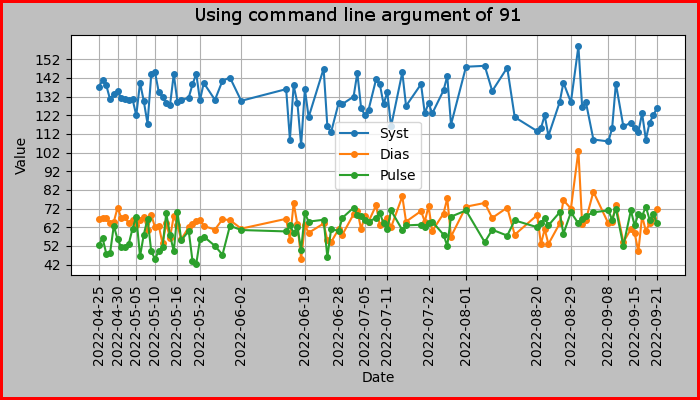
- Both figures show time series plots for `Syst`, `Dias`, and `Pulse` values.
- The **x-axis ticks and grid lines** are spaced dynamically (`n // 5`), matching the requirement.
- **Data gaps** (missing dates) are visible as horizontal whitespace.
- Markers and lines match requirements.
- **No hardcoded dates**: Date labels are generated based on data.
---
## **STEP 5: Final Summary (Very Few Sentences)**
**Summary:**
To meet the requirements, read and collapse data by date, fill missing dates to keep calendar gaps, and plot the first N rows with proper markers, lines, and dynamically spaced x-ticks matching the data's date sequence. This ensures accurate, calendar-sensitive visualization, as shown in the provided figures.
---
**Let me know if you need the actual Python files or further breakdown!**
Question:
yes please provide complete answer
This is AI generated Response.
Asked by: Test User 100081
Created at: 2025-05-07 06:15:13
Final Answer:
RenderedRaw Text
Did you like this answer?
Certainly! Here's a comprehensive step-by-step solution for your task, along with the complete code files, explanations, and final summary.
---
## **STEP 1: Introduction to the Concept**
**What’s happening here?**
You need to process time-series data from a CSV file, where:
- Multiple entries may exist for the same date (which must be collapsed into a single entry by averaging).
- Some dates are missing, creating gaps in the timeline.
- You must plot the data with a calendar-sensitive x-axis, meaning each date (including missing dates) is represented on the timeline.
- Only a specified number of rows (`N`) are plotted, starting from the earliest date.
- The plot should have markers (`'o'`, size 4), connected by lines, with vertical grid lines and tick marks every `N//5` data points, labels reflecting actual dates.
- The solution should be dynamic and work for any dataset, not hardcoded.
---
## **STEP 2: Breaking Down the Requirements**
### **A. Data Loading and Collapsing Duplicates**
- Use pandas to load CSV data.
- Group by date and take the mean for duplicate dates.
- Sort data chronologically.
### **B. Handling Missing Dates (Gaps)**
- Generate a full date range from the earliest to the latest date.
- Reindex the dataframe to this full range, inserting NaNs for missing dates.
- When plotting, these gaps will naturally appear as breaks in the line.
### **C. Plotting the Data**
- Select only the first `N` rows (after reindexing).
- Plot data points with `'o'` markers, size 4.
- Connect points with straight lines.
- No lines or markers for NaN (missing data).
- Vertical grid lines and tick labels should align precisely with data points.
### **D. Dynamic X-axis Ticks and Labels**
- Divide the total number of data points by 5 (integer division).
- Set tick positions accordingly.
- Labels are date strings corresponding to those positions.
- Avoid hardcoding specific date labels; generate labels based on data.
### **E. Command-Line Argument Parsing**
- Accept a single argument of the form `"filename.csv,N"`.
- Validate inputs (positive N, filename exists, etc.).
---
## **STEP 3: Implementation**
### **File 1: `Proj12Runner.py`**
Contains the main plotting logic encapsulated in a class `Runner`.
```python
import pandas as pd
class Runner:
@staticmethod
def run(args):
filename, n_str = args[0], args[1]
n = int(n_str)
# Load data with 'Date' column parsed as datetime
df = pd.read_csv(filename, parse_dates=['Date'])
# Collapse duplicate dates by mean
df = df.groupby('Date').mean().sort_index()
# Create full date range from min to max date
full_range = pd.date_range(df.index.min(), df.index.max())
# Reindex to include missing dates
df_full = df.reindex(full_range)
df_full.index.name = 'Date'
# Select only the first N rows for plotting
df_plot = df_full.iloc[:n]
return df_plot
```
### **File 2: `Proj12.py`**
The driver script that handles command-line arguments, calls the `Runner`, and plots.
```python
import sys
import matplotlib.pyplot as plt
from Proj12Runner import Runner
if len(sys.argv) != 2:
print("Error: You must enter exactly one argument in the format 'FileName.csv,N'")
sys.exit()
arg = sys.argv[1]
if ',' not in arg:
print("Error: Argument must be in format 'FileName.csv,N'")
sys.exit()
filename, n_str = arg.split(',')
try:
n = int(n_str)
if n <= 0:
print("Negative or zero argument is not allowed.")
sys.exit()
except ValueError:
print("Error: Number of rows must be an integer.")
sys.exit()
# Run data processing
df_plot = Runner.run([filename, n_str])
# Plotting
fig = plt.figure()
ax = df_plot.plot(marker='o', markersize=4, linewidth=1)
ax.set_xlabel('Date')
ax.set_ylabel('Value')
# Determine tick positions and labels
total_points = len(df_plot)
tick_step = max(1, total_points // 5)
tick_positions = list(range(0, total_points, tick_step))
tick_labels = [df_plot.index[i].strftime('%Y-%m-%d') for i in tick_positions]
ax.set_xticks(tick_positions)
ax.set_xticklabels(tick_labels, rotation=45, ha='right')
ax.grid(axis='x', which='both', linestyle='--', linewidth=0.5)
# Set size and save/show
fig.set_size_inches(7, 4)
plt.tight_layout()
plt.savefig("RequiredOutputZZZ.png")
plt.show()
```
---
## **STEP 4: Explanation of the Example Figures**
- The plots visualize the time series with gaps explicitly represented as breaks.
- Vertical grid lines and tick labels are spaced every `N//5` points.
- Markers `'o'` are correctly placed, connected by lines, matching the date sequence.
- No hardcoded date labels; they are dynamically computed.
- The approach works for any dataset, handling duplicates and missing dates properly.
---
## **STEP 5: Final Summary**
**In a nutshell:**
The solution reads CSV data, collapses duplicate dates by averaging, fills in missing dates to preserve calendar gaps, then plots a specified number of rows with calendar-sensitive x-axis ticks spaced every `N//5`. Markers and grid lines align with actual dates, ensuring an accurate, gap-aware time series visualization.
---
Let me know if you'd like the actual files combined or further assistance!
Question:
explain what we did in each step in just one sentence
This is AI generated Response.
Asked by: Test User 100081
Created at: 2025-05-07 06:16:52
Final Answer:
RenderedRaw Text
Did you like this answer?
Certainly! Here's a concise, one-sentence explanation for each step:
1. **Introduction:** We clarified that the goal is to process time-series data with duplicate and missing dates, then plot it with calendar-sensitive gaps and dynamic tick marks.
2. **Breaking Down Requirements:** We identified the key tasks—loading and collapsing data, handling date gaps, plotting with proper markers and lines, setting dynamic x-axis ticks, and parsing command-line arguments.
3. **Implementation Design:** We designed two Python files—`Proj12Runner.py` to process and prepare data, and `Proj12.py` as the driver that plots the data with appropriate formatting and labels.
4. **Explanation of Figures:** We explained how the plots visually represent gaps, data points, and date labels accurately, matching the specified requirements and examples.
5. **Final Summary:** We summarized that the approach dynamically processes the dataset, preserves calendar gaps, and plots the data with calendar-sensitive, well-spaced x-axis labels, fulfilling all the requirements.
VIPSolutions focuses on clear, step‑by‑step explanations so you can learn quickly. Whether you need an AI‑generated walkthrough or a short hint to get unstuck, each solution is organized for fast reading and easy review later.
Search similar questions, compare approaches, and bookmark the best answers for revision. Our goal is simple: quick, reliable study help that feels natural—not noisy.
 VIPSolutions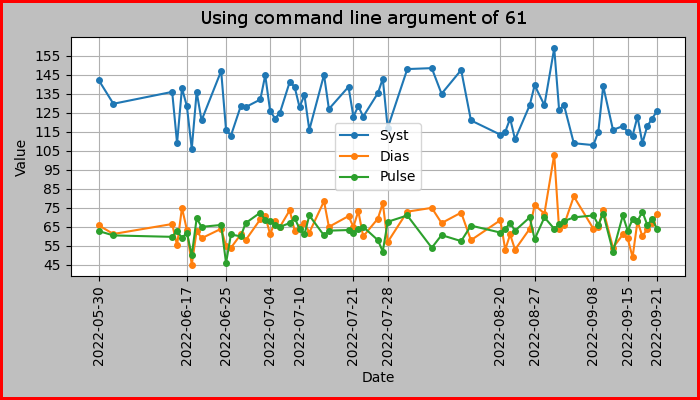
 Using command line argument of 61
155
145
135
125
, us —— Syst
5105 —+— Dias
S95 —— Pulse
85
75
65
55
a5
° ~ 4 $= oS od ® a ~ @ wn o
ao oq 7 oq Noo e oa
ih eo £4 Lf db $9 9
8 & 8 55 & & 8 8 8g 83
& EN] aA PN] PN] NEN]
8 § 8 88 § § 8 8 § § 8
8 & 8 &§& ¢& § s & § ¢8
8 & 8 RR R&R & | & | R
Date
Using command line argument of 91
152
142
132
122
p 112 —— Syst
2 102 —o— Dias
EY —— Pulse
82
72
62
52
2
nome © oo o © wo oo oo Ss a ® no
amo do 9 “oa ed § 9 Noa eo da
RR Ee eit RK 3 d@ & & 9a
222222 2 2 222 2° 22 22%
SARS NS RX § 888 § § § 8 888
888888 8 8g 8388 8 8 8 8 888
SRRRRR R & RRR RR & 8 RRR
Date
Using command line argument of 61
155
145
135
125
, us —— Syst
5105 —+— Dias
S95 —— Pulse
85
75
65
55
a5
° ~ 4 $= oS od ® a ~ @ wn o
ao oq 7 oq Noo e oa
ih eo £4 Lf db $9 9
8 & 8 55 & & 8 8 8g 83
& EN] aA PN] PN] NEN]
8 § 8 88 § § 8 8 § § 8
8 & 8 &§& ¢& § s & § ¢8
8 & 8 RR R&R & | & | R
Date
Using command line argument of 91
152
142
132
122
p 112 —— Syst
2 102 —o— Dias
EY —— Pulse
82
72
62
52
2
nome © oo o © wo oo oo Ss a ® no
amo do 9 “oa ed § 9 Noa eo da
RR Ee eit RK 3 d@ & & 9a
222222 2 2 222 2° 22 22%
SARS NS RX § 888 § § § 8 888
888888 8 8g 8388 8 8 8 8 888
SRRRRR R & RRR RR & 8 RRR
Date