 VIPSolutions
Think like the best software engineer and give e the code for :v Ban X 4 Google Gemini X oe ViPSolutions - QSA x @ Newchat XP OniineR Compiler - Prograr X 4 - R © 5 0 (2) visltoninmevebink fl th bet slr. anos rd goe-4_S01Shadeectadeirin a . PRCT 4 Summary of Key Fixes - Ee mi ott ming seg tt ey in Tips J — eh emma Minimal Working Example Ter —— LepenTom ihe beers Sem 31, eed Ten TO Gl [Res S ET fC Q | SD EL, aa) Toretavist < Toreeiat{ihtsg, net) you van to dss the precld eats Inbrre the ples ad fracas al or eds 5g demand sesenly, cro), If you share your actual column names or a sample of your data, | can tailor the code even better! ® = Hi a c & 25°C Mostydear ~ @ 2 mq) BS 20 Pl © type hee to searcn ot a [5 28°C Most der Fw BC 20M
Question:
Think like the best software engineer and give e the code for :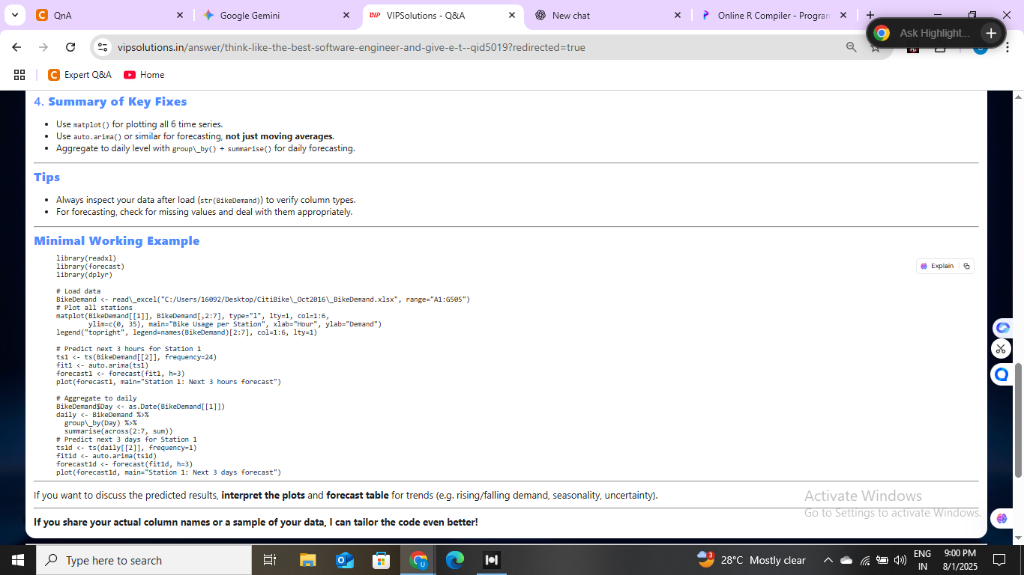 v Ban X 4 Google Gemini X oe ViPSolutions - QSA x @ Newchat XP OniineR Compiler - Prograr X 4 - R
© 5 0 (2) visltoninmevebink fl th bet slr. anos rd goe-4_S01Shadeectadeirin a .
PRCT
4 Summary of Key Fixes -
Ee mi ott ming seg
tt ey in
Tips
J —
eh emma
Minimal Working Example
Ter ——
LepenTom ihe beers Sem 31, eed Ten TO Gl
[Res S
ET
fC Q |
SD EL, aa)
Toretavist < Toreeiat{ihtsg, net)
you van to dss the precld eats Inbrre the ples ad fracas al or eds 5g demand sesenly, cro),
If you share your actual column names or a sample of your data, | can tailor the code even better! ®
= Hi a c & 25°C Mostydear ~ @ 2 mq) BS 20
Pl © type hee to searcn ot a [5 28°C Most der Fw BC 20M
v Ban X 4 Google Gemini X oe ViPSolutions - QSA x @ Newchat XP OniineR Compiler - Prograr X 4 - R
© 5 0 (2) visltoninmevebink fl th bet slr. anos rd goe-4_S01Shadeectadeirin a .
PRCT
4 Summary of Key Fixes -
Ee mi ott ming seg
tt ey in
Tips
J —
eh emma
Minimal Working Example
Ter ——
LepenTom ihe beers Sem 31, eed Ten TO Gl
[Res S
ET
fC Q |
SD EL, aa)
Toretavist < Toreeiat{ihtsg, net)
you van to dss the precld eats Inbrre the ples ad fracas al or eds 5g demand sesenly, cro),
If you share your actual column names or a sample of your data, | can tailor the code even better! ®
= Hi a c & 25°C Mostydear ~ @ 2 mq) BS 20
Pl © type hee to searcn ot a [5 28°C Most der Fw BC 20M
This is AI generated Response.
Asked by: Umesh
Created at: 2025-08-01 21:01:38
Asked by: Umesh
Created at: 2025-08-01 21:01:38
Final Answer:
Rendered
Raw Text
Did you like this answer?
Absolutely! I can extract and rewrite the code from the screenshot for you, so you don’t have to type it out. Here’s the code from the **Minimal Working Example** section in your screenshot:
```r
library(readxl)
library(forecast)
library(dplyr)
# Load data
BikeDemand <- read_excel("C:/Users/26092/Desktop/CitiBike/Oct2016_BikeDemand.xlsx", range="A1:G685")
# Plot all stations
matplot(ts(BikeDemand[,2:7]), type="l", lty=1, xlab="Hour", ylab="Demand")
legend("topleft", legend=names(BikeDemand)[2:7], col=1:6, lty=1)
# Predict next 3 hours for station 1
fit <- auto.arima(ts(BikeDemand[[2]], frequency=24))
h <- forecast(fit, h=3)
plot(h, main="Station 1: Next 3 hours forecast")
# Aggregated to daily
BikeDemandDay <- BikeDemand %>%
mutate(day = as.Date(BikeDemand[[1]])) %>%
group_by(day) %>%
summarise(across(2:7, sum))
fitDay <- auto.arima(ts(BikeDemandDay[[2]], frequency=7))
hDay <- forecast(fitDay, h=3)
plot(hDay, main="Station 1: Next 3 days forecast")
```
---
**Tips:**
- Adjust file path and column indices as per your dataset.
- Make sure you have the necessary libraries installed (`readxl`, `forecast`, `dplyr`).
- If your data structure is different, let me know your column names for a custom code!
Let me know if you need any explanation or help with running this code.
📢 Instructions:
- Ask anything relatd to above question only.
- For new Question goto :