 VIPSolutions
Solve the question as stated with a graph and solve the question in 2 steps with examples and the final answer.Create a 3D model of this object in Solidworks. All units are in Millimeter. The drawing projections was created in 1% Angle Projection. ODE 200 ooo mE | | | | ] : } ==} 10 | | 10 Ls | 1D EE GUS OLrg z 0 ~ =| Leh = 100 0
Question:
Solve the question as stated with a graph and solve the question in 2 steps with examples and the final answer.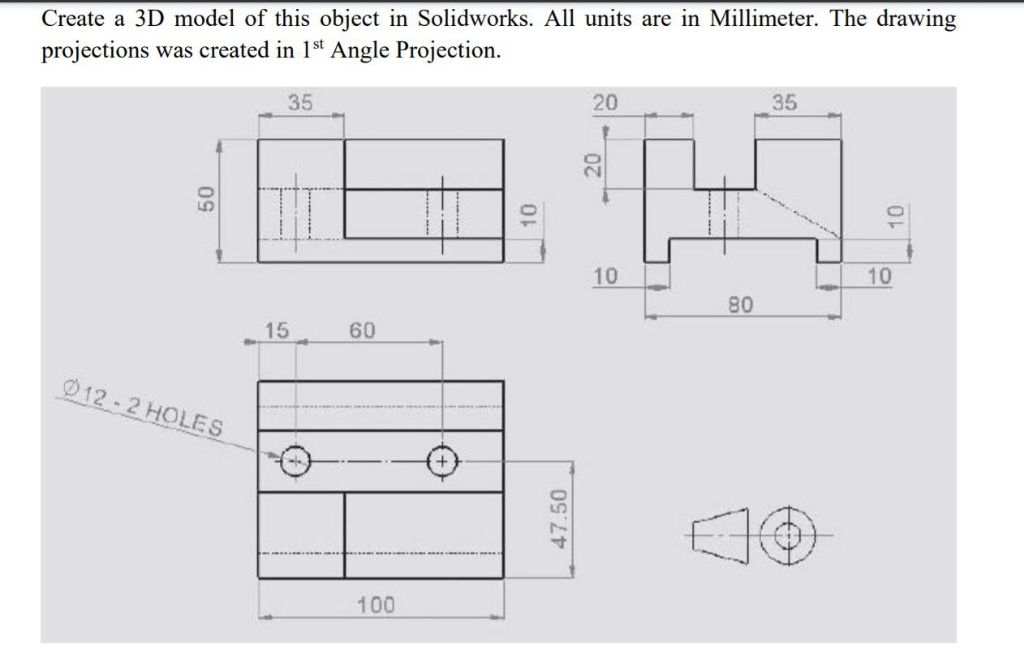 Create a 3D model of this object in Solidworks. All units are in Millimeter. The drawing
projections was created in 1% Angle Projection.
ODE 200 ooo mE
| | |
|
]
: } ==}
10 | | 10
Ls |
1D EE GUS
OLrg
z 0
~ =|
Leh
= 100 0
Create a 3D model of this object in Solidworks. All units are in Millimeter. The drawing
projections was created in 1% Angle Projection.
ODE 200 ooo mE
| | |
|
]
: } ==}
10 | | 10
Ls |
1D EE GUS
OLrg
z 0
~ =|
Leh
= 100 0
This is AI generated Response.
Asked by: Mk
Created at: 2026-01-09 17:43:14
Asked by: Mk
Created at: 2026-01-09 17:43:14
Final Answer:
Rendered
Raw Text
Did you like this answer?
# How to Model the Given Object in SolidWorks (Step-by-Step Guide)
## Step 1: Sketch and Extrude the Basic Shape
**Example:**
1. **Open SolidWorks and start a new part.**
2. **Select the Top Plane** and draw a rectangle with dimensions 100 (length) by 50 mm (width).
3. **Extrude** this rectangle to a depth of 20 mm (height).
**Graphical Representation:**
```
Top View (after extrusion):
+-----------------------------------------+
| |
| |
| | 100 mm
| |
| |
+-----------------------------------------+
50 mm
```
---
## Step 2: Add Cutouts and Holes
### (A) Create the Step Feature
1. **On the front face**, sketch a rectangle 80 mm wide (centered) and 10 mm high, starting from the bottom edge.
2. **Extrude Cut** this sketch to a depth of 10 mm.
3. **On the same front face,** above the previous cut, sketch another rectangle 60 mm wide (centered) and 20 mm high, starting from the top.
4. **Extrude Cut** this rectangle to a depth of 20 mm.
### (B) Add the Holes
1. **On the top face,** mark two points, each 15 mm from the left/right edge and 25 mm from the bottom edge.
2. **Draw two circles** of diameter 12 mm at these points.
3. **Extrude Cut** through all to create the holes.
**Graphical Representation:**
```
Front View (after all cuts and holes):
+----------------------+
| _________ | <-- Step cut at the top
| | | |
| | | | <-- Two holes here
| | | |
| | | |
|_____| |______| <-- Step cut at the bottom
```
---
## Final Answer: 3D Model Overview
- **Dimensions:** Length = 100 mm, Width = 50 mm, Height = 20 mm
- **Features:** Stepped cutouts on both top and bottom faces, two Ø12 mm holes
**Example of 3D View:**
*(This would be visualized in SolidWorks as a block with upper and lower recesses and two holes as per the drawing)*
---
### Summary Table
| Step | Description | SolidWorks Feature |
|------|----------------------------------|---------------------|
| 1 | Extrude main rectangle | Extruded Boss/Base |
| 2 | Add step features (cutouts) | Extruded Cut |
| 3 | Add two holes | Extruded Cut (Hole) |
---
**You can now use these steps to create the required 3D model in SolidWorks!**
If you need a reference 3D illustration, you can use SolidWorks' "Isometric View" after modeling to visualize the completed part.
📢 Instructions:
- Ask anything relatd to above question only.
- For new Question goto :