 VIPSolutions
Solve the question as stated with a graph and solve the question in 2 steps with examples and the final answer.(a) Using AutoCAD, draw front and top view and section A-A, units are in mm. Add dimensions. 2 i % , SY 3 iE - a A _ FE _ pe Nay oS . 2 e i oT ) AL < r EY 125 Lreidl
Question:
Solve the question as stated with a graph and solve the question in 2 steps with examples and the final answer.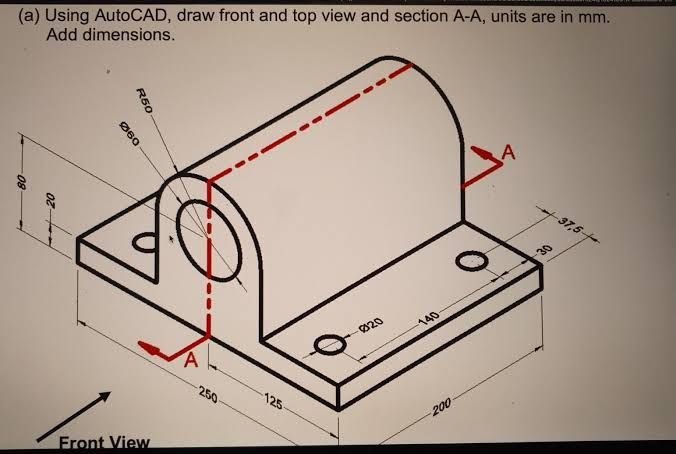 (a) Using AutoCAD, draw front and top view and section A-A, units are in mm.
Add dimensions.
2 i
%
, SY
3
iE - a A
_
FE _ pe
Nay oS
. 2
e
i oT )
AL < r
EY 125 Lreidl
(a) Using AutoCAD, draw front and top view and section A-A, units are in mm.
Add dimensions.
2 i
%
, SY
3
iE - a A
_
FE _ pe
Nay oS
. 2
e
i oT )
AL < r
EY 125 Lreidl
This is AI generated Response.
Asked by: Mk
Created at: 2026-01-07 17:54:28
Asked by: Mk
Created at: 2026-01-07 17:54:28
Final Answer:
Rendered
Raw Text
Did you like this answer?
# Solution to the Engineering Drawing Problem
**Task:**
Draw the **front**, **top**, and **section A-A** of the given component using AutoCAD, with proper dimensions.
---
## Step 1: Identify and Sketch the Views
### 1. **Front View**
- **What is it?**
The front view is what you see looking directly at the face labeled as "Front View" in the isometric drawing.
- **Features to include:**
- The semicircular top profile (R80).
- The vertical rectangle (height 80 mm, width 80 mm).
- The base plate (250 mm x 200 mm).
- The hole (Ø60 mm) and the holes (Ø20 mm) on the base.
**Example (Front View):**
```
________
/ \
| |
| | <- 80 mm height
| |
| |
|__________|
<---250 mm--->
```
---
### 2. **Top View**
- **What is it?**
The top view is looking down from above.
- **Features to include:**
- The full base rectangle (250 mm × 200 mm).
- The positions of all holes (center distances given).
- The arc/semicircle projection as a rectangle.
**Example (Top View):**
```
___________________________
| o o | <- Holes (Ø20 mm)
| |
| |
| O | <- Large hole (Ø60 mm)
|___________________________|
<-------250 mm-------------->
```
---
### 3. **Section A-A**
- **What is it?**
This is a sectional view cut along the A-A line (vertical plane through the center).
- **Features to include:**
- Shows the internal profile of the semicircle (R80), the vertical walls, and the hole (Ø60 mm).
- The base with the holes sectioned.
**Example (Section A-A):**
```
________
/ \
| |
| (hole) | <- Ø60 mm through section
| |
|__________|
<---base--->
```
---
## Step 2: Add Dimensions
- Add all critical dimensions as shown in the isometric view:
- Base: 250 mm × 200 mm
- Height: 80 mm
- Hole diameters: Ø20 mm, Ø60 mm
- Hole positions: 125 mm from left, 140 mm between holes, etc.
- Semicircle radius: R80 mm
---
### **Summary Table**
| View | Main Features | Key Dimensions |
|------------|----------------------------------------------------|-----------------------------|
| Front | Semicircle, base, holes | 80 mm height, 250 mm width |
| Top | Rectangle, hole positions, overall layout | 250 mm × 200 mm, holes |
| Section A-A| Internal profile, cut holes, semicircle, wall | Ø60 mm, R80 mm, base thick |
---
## **Final Answer**
To solve the question:
1. **Draw the front and top views with all given dimensions.**
2. **Draw the sectional view along A-A, showing internal features and add dimensions.**
This process will clearly communicate the design, as required for technical and manufacturing purposes.
---
**Note:**
For actual CAD drawing, use tools like **AutoCAD** to draft these views accurately to scale, using the given dimensions.
📢 Instructions:
- Ask anything relatd to above question only.
- For new Question goto :