This is AI generated Response.
Asked by: Mk
Created at: 2026-01-06 22:11:49
Final Answer:
RenderedRaw Text
Did you like this answer?
# SolidWorks Part Modeling Solution
Let's break down the solution to **Problem 3** into **2 clear steps** with explanations and examples.
---
## **Step 1: Create the Base Feature**
### **Instructions:**
1. **Sketch the Base Rectangle:**
- Start a new part in SolidWorks.
- On the Top Plane, sketch a rectangle with dimensions **5.00 in x 3.00 in**.
- Add two circles (diameter .50 in) at the bottom corners, using the given .50 in offset from the edges.
2. **Extrude the Base:**
- Extrude the base to a height of **.50 in**.
3. **Add Fillets:**
- Apply fillets (radius .50 in) to the two vertical front edges as shown.
**Example:**
- Select the Fillet tool, select the two vertical edges, and enter a radius of .50 in.
**Graphical Representation:**
```plaintext
|------------------- 5.00 in -------------------|
| |
| |
| | 3.00 in
| |
| |
-------------------------------------------------
```
*(Add holes and fillets as per dimensions.)*
---
## **Step 2: Create the Inclined Feature and Final Holes**
### **Instructions:**
1. **Inclined Plane Sketch:**
- On the top face of the base, sketch the inclined rectangle (2.00 in x 1.50 in) starting 2.00 in from the left and 1.00 in from the bottom.
- Add a semicircular end (radius 1.00 in).
- Add the hole in the center (diameter .75 in).
2. **Extrude Inclined Feature:**
- Create a new plane by selecting the two side points and using the "Reference Geometry > Plane" option.
- Sketch the inclined profile and use the **Extrude Boss/Base**, selecting the “Up to Surface” option, so the extrusion follows the sloped face.
3. **Add Final Holes:**
- Add the two holes (diameter .50 in) at the top corners, using the .50 in offset from the top and side edges.
**Example:**
- Use "Extruded Boss/Base" and "Up To Surface" to create the inclined feature.
**Graphical Representation:**
```plaintext
.-.
/ \
| | <--- Inclined feature
| |
'-----'
```
*(Add center hole and align as per drawing.)*
---
## **Final Answer Summary**
- **Step 1:** Sketch and extrude the 5x3 in base, add corner holes, and apply fillets.
- **Step 2:** Sketch and extrude the inclined feature with the semicircular end and hole, using the "Up to Surface" option. Add remaining holes.
**Your part is now complete as per the given drawing!**
---
**Tip:**
Name the file as instructed:
`Problem3_YourLastName.SLDPRT`
---
**Let me know if you need a step-by-step guide with SolidWorks screenshots!**
VIPSolutions focuses on clear, step‑by‑step explanations so you can learn quickly. Whether you need an AI‑generated walkthrough or a short hint to get unstuck, each solution is organized for fast reading and easy review later.
Search similar questions, compare approaches, and bookmark the best answers for revision. Our goal is simple: quick, reliable study help that feels natural—not noisy.
 VIPSolutions
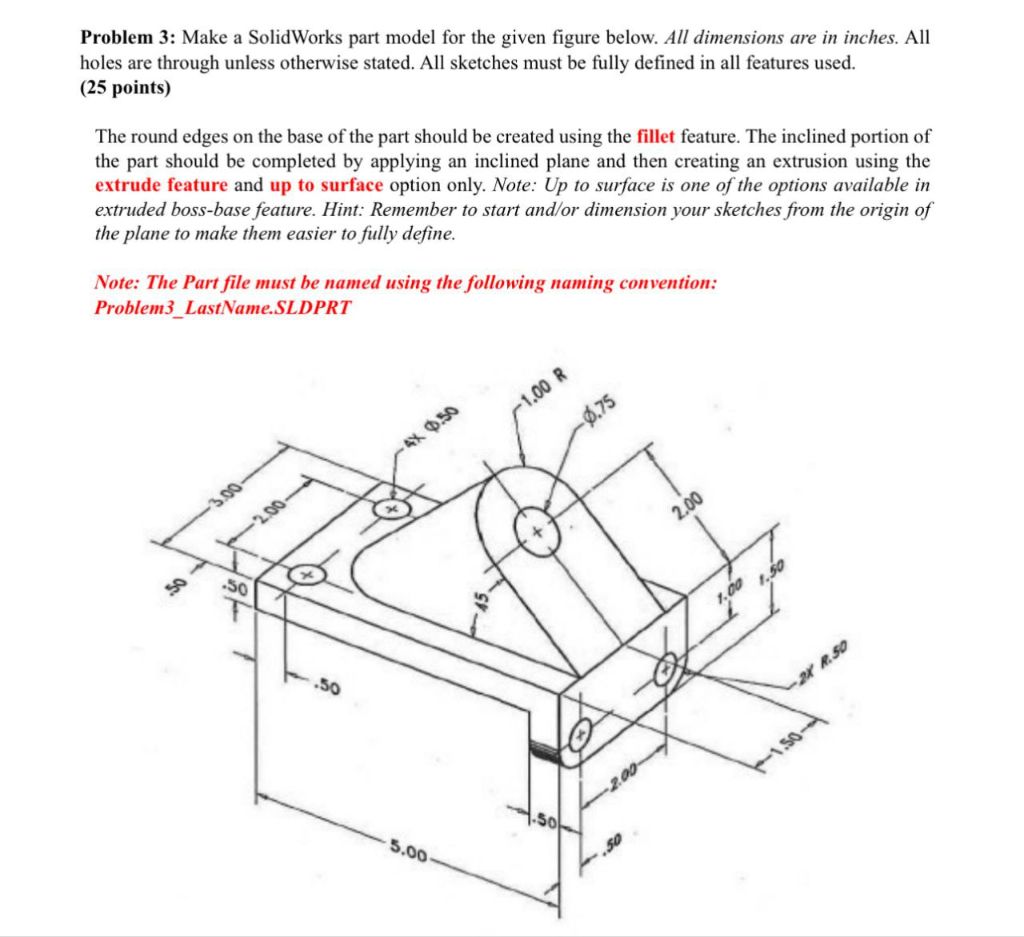 Problem 3: Make a SolidWorks part model for the given figure below. All dimensions are in inches. All
holes are through unless otherwise stated. All sketches must be fully defined in all features used.
(25 points)
The round edges on the base of the part should be created using the fillet feature. The inclined portion of
the part should be completed by applying an inclined plane and then creating an extrusion using the
extrude feature and up to surface option only. Note: Up to surface is one of the options available in
extruded boss-base feature. Hint: Remember to start and/or dimension your sketches from the origin of
the plane to make them easier to fully define.
Note: The Part file must be named using the following naming convention:
Problem3_LastName.SLDPRT
*
®
AS ©
& ¥
-
GF A he Kd Ph
LL SP or NY
SE bo
td
2% #
So > ’
7
(0) RE
4
S.09 Fd
Problem 3: Make a SolidWorks part model for the given figure below. All dimensions are in inches. All
holes are through unless otherwise stated. All sketches must be fully defined in all features used.
(25 points)
The round edges on the base of the part should be created using the fillet feature. The inclined portion of
the part should be completed by applying an inclined plane and then creating an extrusion using the
extrude feature and up to surface option only. Note: Up to surface is one of the options available in
extruded boss-base feature. Hint: Remember to start and/or dimension your sketches from the origin of
the plane to make them easier to fully define.
Note: The Part file must be named using the following naming convention:
Problem3_LastName.SLDPRT
*
®
AS ©
& ¥
-
GF A he Kd Ph
LL SP or NY
SE bo
td
2% #
So > ’
7
(0) RE
4
S.09 Fd