 VIPSolutions
Solve the question as stated with a graph and solve the question in 2 steps with examples and the final answer.Problem 4: Make a solid works part from the given figure below. All sketches must be fully defined. Submit your part file to Canvas following the naming convention: Problem 4_Last Name. SLDPRT All dimensions are in millimeters. (35 points) Pe 4 ES) = S Through hole J 920, C bore to 030 x 6 doop 0 \ on both sides | AS =, > | &S SE — \ k 015 Q\ ho xX
Question:
Solve the question as stated with a graph and solve the question in 2 steps with examples and the final answer.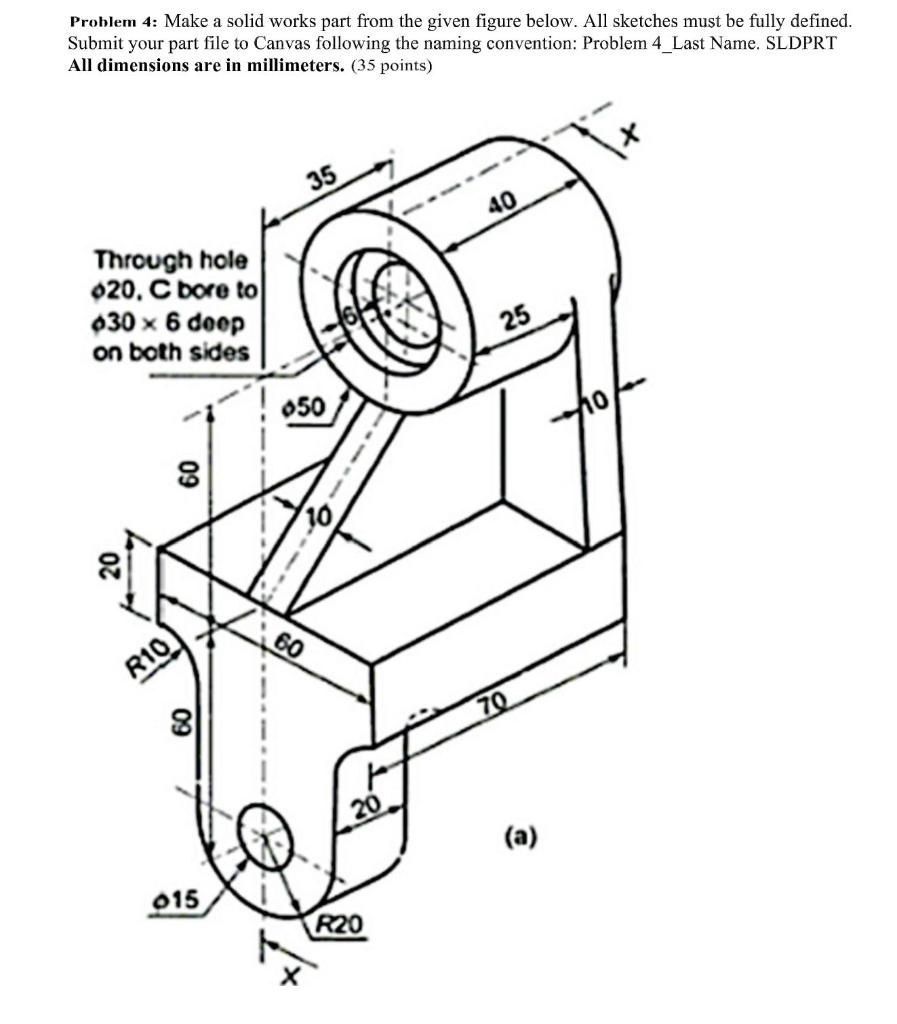 Problem 4: Make a solid works part from the given figure below. All sketches must be fully defined.
Submit your part file to Canvas following the naming convention: Problem 4_Last Name. SLDPRT
All dimensions are in millimeters. (35 points)
Pe 4
ES) = S
Through hole
J
920, C bore to
030 x 6 doop 0 \
on both sides | AS
=,
>
|
&S SE —
\
k
015 Q\
ho
xX
Problem 4: Make a solid works part from the given figure below. All sketches must be fully defined.
Submit your part file to Canvas following the naming convention: Problem 4_Last Name. SLDPRT
All dimensions are in millimeters. (35 points)
Pe 4
ES) = S
Through hole
J
920, C bore to
030 x 6 doop 0 \
on both sides | AS
=,
>
|
&S SE —
\
k
015 Q\
ho
xX
This is AI generated Response.
Asked by: Rahul
Created at: 2026-01-05 19:29:36
Asked by: Rahul
Created at: 2026-01-05 19:29:36
Final Answer:
Rendered
Raw Text
Did you like this answer?
# Solution for Problem 4: 3D Solid Modeling (SolidWorks)
## Step 1: **Analyze and Sketch the Main Profiles**
- **Identify Main Features:**
- The object consists of three primary sections:
1. The base with rounded ends
2. The vertical support
3. The top cylindrical boss with a through hole
- **Key Dimensions (in mm):**
- **Base:** 70 (length) × 20 (width) × 20 (height), fillet R20 and R10 at the ends
- **Vertical Support:** 60 (height), thickness 10
- **Cylindrical Boss:** Outer Ø40, length 35, inner through hole Ø20, C bore to Ø30 × 6 deep
- **Other holes:** Ø15 at the base, located at center
**Example Sketch for Base Profile:**
- Draw a rectangle, 70 mm × 20 mm, with semicircular ends (R20 on one side, R10 on the other).
- Add vertical support rectangle 60 mm tall, 10 mm thick, offset 10 mm from side.
- Sketch the boss on top, centered, with a 40 mm diameter.
---
## Step 2: **Extrude and Cut Features**
1. **Extrude the Base and Support:**
- **Base:** Extrude the sketched base to 20 mm.
- **Support:** Extrude the vertical support rectangle from the base to 60 mm.
2. **Add Boss and Holes:**
- **Boss:** Draw a circle (Ø40) on the top face, extrude it 35 mm.
- **Through Hole:** Cut a Ø20 hole through the boss.
- **Counter Bore:** Add a counter bore (Ø30, 6 mm deep) on both sides of the boss.
- **Base Hole:** Add a Ø15 hole at the base center.
**Example SolidWorks Feature Sequence:**
- Extrude Base: 20 mm thick
- Extrude Support: 10 mm thick, 60 mm tall
- Extrude Boss: 40 mm diameter, 35 mm long
- Cut Boss Hole: 20 mm diameter through-all
- Counter Bore: 30 mm diameter, 6 mm deep
- Cut Base Hole: 15 mm diameter
---
## Final Answer
**The final solid model will match all the provided dimensions and features as shown in the figure.**
All sketches must be **fully defined** in SolidWorks, and the final model should look like the given drawing.
---
### Sample Graphical Representation

*Alt text: Example of a similar 3D part model and its sketches in SolidWorks.*
---
### **Summary Table of Steps**
| Step | Action | Key Dimension(s) |
|------|-----------------------------------------|----------------------|
| 1 | Sketch base with fillets and support | 70×20, R20, R10, 10 |
| 2 | Extrude base and support | 20 mm, 60 mm |
| 3 | Sketch & extrude top boss | Ø40, 35 mm |
| 4 | Cut through holes & counter bores | Ø20, Ø30×6, Ø15 |
---
**Tip:** Use the "Fully Define Sketch" tool in SolidWorks to ensure all sketches are constrained.
**Final Output:** Save your part as `Problem_4_LastName.SLDPRT` and submit as required.
📢 Instructions:
- Ask anything relatd to above question only.
- For new Question goto :