 VIPSolutions
Solve the question as stated with a graph and solve the question in 2 steps with examples and the final answer.Provide front, side and upper views with dimensions of the given part below using AutoCAD (20 Also add the ite box with the ssked views.
Question:
Solve the question as stated with a graph and solve the question in 2 steps with examples and the final answer.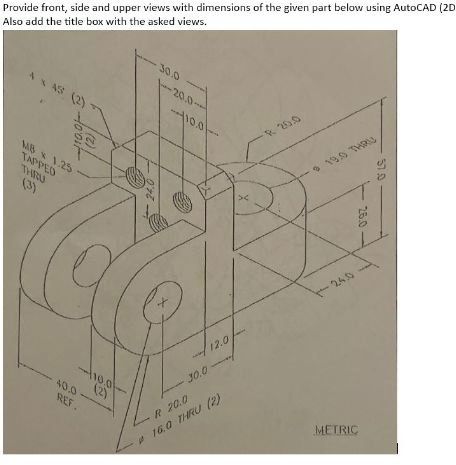 Provide front, side and upper views with dimensions of the given part below using AutoCAD (20
Also add the ite box with the ssked views.
Provide front, side and upper views with dimensions of the given part below using AutoCAD (20
Also add the ite box with the ssked views.
This is AI generated Response.
Asked by: Rahul
Created at: 2026-01-04 16:07:53
Asked by: Rahul
Created at: 2026-01-04 16:07:53
Final Answer:
Rendered
Raw Text
Did you like this answer?
# 2 Orthographic Projections from Isometric Drawing
Given the isometric drawing, we are to **create front, side, and top views with dimensions**. Here’s how you can approach this in 2 steps, with illustrative examples:
---
## **Step 1: Analyze and Extract Key Dimensions**
### **Key Features:**
- **Overall block:** 90 mm (L) × 30 mm (W) × 50 mm (H)
- **Key holes and slots:**
- 2 large holes (R20, Ø40)
- 2 side holes (Ø16)
- 3 tapped holes (M8 × 1.25)
- **Outer slots:** 12 mm wide, spaced 30 mm apart
**_Example:_**
- The distance from the left end to the center of the large hole is 30 mm.
- The height from the bottom to the center of the large hole is 25 mm.
---
## **Step 2: Draw the 2D Views**
### **A. Front View**
- Shows the two large holes (R20) and their positions.
- Shows the overall height and width.
- Includes the slot cut between the holes.
- **Dimensions to Add:**
- Overall height: 50 mm
- Distance between holes: 30 mm
- Hole diameters: Ø40 mm
- Slot width: 12 mm
**_Example (ASCII representation):_**
```
______________________________________
| |
| O O | ← Holes (front)
|______________________________________|
```
---
### **B. Side View**
- Shows the thickness (30 mm), location of tapped holes, and side holes.
- Indicates the slot and the thickness of the arms.
- **Dimensions to Add:**
- Thickness: 30 mm
- Tapped hole positions: 10 mm, 20 mm, 30 mm from top
- Side hole: Ø16 mm
**_Example:_**
```
___________________
| |
| o o o | ← Tapped holes
| |
| |
| O | ← Side hole
|___________________|
```
---
### **C. Top View**
- Shows the slot separation and width.
- Shows the tapped hole positions and spacing.
- **Dimensions to Add:**
- Overall length: 90 mm
- Slot width: 12 mm
- Distance between slots: 30 mm
**_Example:_**
```
______________________________
| | | | |
|___|________|________|________|
```
---
## **Final Answer (What to Draw in AutoCAD):**
1. **Draw three 2D views:**
- **Front view:** Show two large holes, slot, and overall height/width.
- **Side view:** Show thickness, tapped holes, and side hole.
- **Top view:** Show slot width, length, and tapped hole spacing.
2. **Add dimensions** as shown above in each view.
3. **Add a title box** containing:
- Drawing title: "Orthographic Views of Mechanical Part"
- Scale: 1:1 or as needed
- Date, Drafter’s Name, etc.
---
### **Illustrative Reference**
| View | Main Features to Include |
|--------------|-----------------------------------------------------------------------|
| Front View | 2 large holes, slot, arms, overall height/width |
| Side View | Tapped holes, thickness, side hole |
| Top View | Slot separation, slot width, overall length, tapped hole locations |
---
**Use these steps to create accurate 2D orthographic projections in AutoCAD.**
If you need an actual drawing or AutoCAD file, let me know!
📢 Instructions:
- Ask anything relatd to above question only.
- For new Question goto :