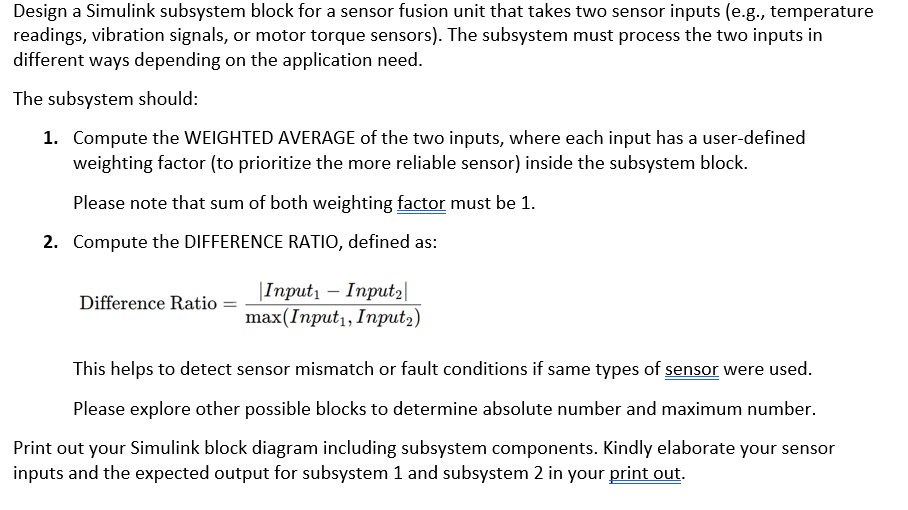
Please solve step by step full example addDesign a Simulink subsystem block for a sensor fusion unit that takes two sensor inputs (e.g., temperature
readings, vibration signals, or motor torque sensors). The subsystem must process the two inputs in
different ways depending on the application need.
The subsystem should:
1. Compute the WEIGHTED AVERAGE of the two inputs, where each input has a user-defined
weighting factor (to prioritize the more reliable sensor) inside the subsystem block.
Please note that sum of both weighting factor must be 1.
2. Compute the DIFFERENCE RATIO, defined as:
I — I
Difference Ratio = |17Put1 — Inputal
max(Input,, Inputy)
This helps to detect sensor mismatch or fault conditions if same types of sensor were used.
Please explore other possible blocks to determine absolute number and maximum number.
Print out your Simulink block diagram including subsystem components. Kindly elaborate your sensor
inputs and the expected output for subsystem 1 and subsystem 2 in your print out.
Question:
Please solve step by step full example addDesign a Simulink subsystem block for a sensor fusion unit that takes two sensor inputs (e.g., temperature
readings, vibration signals, or motor torque sensors). The subsystem must process the two inputs in
different ways depending on the application need.
The subsystem should:
1. Compute the WEIGHTED AVERAGE of the two inputs, where each input has a user-defined
weighting factor (to prioritize the more reliable sensor) inside the subsystem block.
Please note that sum of both weighting factor must be 1.
2. Compute the DIFFERENCE RATIO, defined as:
I — I
Difference Ratio = |17Put1 — Inputal
max(Input,, Inputy)
This helps to detect sensor mismatch or fault conditions if same types of sensor were used.
Please explore other possible blocks to determine absolute number and maximum number.
Print out your Simulink block diagram including subsystem components. Kindly elaborate your sensor
inputs and the expected output for subsystem 1 and subsystem 2 in your print out.
This is AI generated Response.
Asked by: Rahul
Created at: 2025-09-29 06:15:59
Final Answer:
RenderedRaw Text
Did you like this answer?
# Step-by-Step Solution: Simulink Subsystem for Sensor Fusion
Let's break down the requirements and provide a **full example** for implementing and testing this in Simulink.
---
## **1. Problem Analysis and Formulae**
- **Inputs:** `Input1`, `Input2` (sensor signals)
- **Weighting Factors:** `w1`, `w2` (user-defined, and **w1 + w2 = 1**)
- **Output 1:** Weighted Average = \( w_1 \times Input1 + w_2 \times Input2 \)
- **Output 2:** Difference Ratio = \( \frac{|Input1 - Input2|}{\max(Input1, Input2)} \)
---
## **2. Simulink Subsystem Block Design**
### **Subsystem Inputs and Outputs:**
- **Inputs:**
- Sensor 1 (`Input1`)
- Sensor 2 (`Input2`)
- Weighting factor 1 (`w1`) *(w2 = 1 - w1, so only one input needed for weight)*
- **Outputs:**
- Weighted Average
- Difference Ratio
---
### **3. Simulink Block Diagram Components**
#### **a. Weighted Average Calculation**
- **Blocks Needed:**
1. **Product** (multiply `Input1` by `w1`)
2. **Sum** (add weighted `Input1` and weighted `Input2`)
3. **Gain/Math Function** (multiply `Input2` by `w2 = 1-w1`)
#### **b. Difference Ratio Calculation**
- **Blocks Needed:**
1. **Subtract** (`Input1` - `Input2`)
2. **Abs** (absolute value)
3. **Max** (find max of `Input1`, `Input2`)
4. **Divide** (difference/max)
---
### **4. Example Simulink Block Diagram**
Below is a textual representation. You should create this in Simulink using the described blocks.
```
Inputs: Subsystem Block Outputs:
-----------------------------------------------------------
Input1 ----->| |----> Weighted Avg
Input2 ----->| Sensor Fusion Subsystem |----> Diff Ratio
w1 ----->| |
-----------------------------------------------------------
```
**Internal to Subsystem:**
- **Weighted Average:**
- Product1: Input1 * w1
- Product2: Input2 * (1-w1)
- Sum: (Product1 + Product2) → Output1
- **Difference Ratio:**
- Subtract: Input1 - Input2
- Abs: |Input1 - Input2|
- Max: max(Input1, Input2)
- Divide: Abs / Max → Output2
---
## **5. Example Calculation**
Let's use an example:
- **Input1 = 40**
- **Input2 = 50**
- **w1 = .7**
- **w2 = .3** (since w2 = 1 - w1)
### **Weighted Average**
\[
\text{Weighted Average} = w_1 \times Input1 + w_2 \times Input2 = .7 \times 40 + . \times 50 = 28 + 15 = 43
\]
### **Difference Ratio**
\[
\text{Difference Ratio} = \frac{|40 - 50|}{\max(40, 50)} = \frac{10}{50} = .2
\]
**Expected Outputs:**
- **Weighted Average:** 43
- **Difference Ratio:** .2
---
## **6. Simulink Block Setup (Summary Table)**
| Block | Function | Inputs | Output |
|---------------|------------------------------------|--------------------------|-------------------|
| Product1 | Multiply Input1 by w1 | Input1, w1 | Input1\*w1 |
| Product2 | Multiply Input2 by (1-w1) | Input2, (1-w1) | Input2\*(1-w1) |
| Sum | Add Product1 and Product2 | Product1, Product2 | Weighted Average |
| Subtract | Input1 - Input2 | Input1, Input2 | Diff |
| Abs | Absolute value | Diff | |Diff| |
| Max | Maximum | Input1, Input2 | max(Input1,Input2)|
| Divide | |Diff| / max(Input1, Input2) | |Diff|, max(Input1,Input2)| Difference Ratio |
---
## **7. Additional Notes**
- You can use **Constant** blocks to set test values for `Input1`, `Input2`, and `w1` during simulation.
- Use **Display** or **Scope** blocks to see the outputs.
- **Test** with different sensor values and weights to see the effect.
---
## **8. Printout (Subsystem and Expected Outputs)**
**Sensor Inputs for Example:**
- Input1 = 40
- Input2 = 50
- w1 = .7
**Expected Subsystem Outputs:**
- Subsystem 1 (Weighted Average): **43**
- Subsystem 2 (Difference Ratio): **.2**
---
## **Block Diagram Illustration**
Below is a simple sketch (please implement in Simulink):
```plaintext
[Input1] ---+--[Product: *w1]---+
| |
+--[Subtract]--[Abs]----+
| | |
[Input2] ---+--[Product: *w2]--+ +--[Divide]---> [Difference Ratio]
| | |
+--[Max]-----------+ +--[Sum]-----> [Weighted Average]
[w1] -----+ ^
(use 1-w1 for w2)
```
---
## **Summary**
- **Create a Simulink subsystem** as described above.
- **Set sensor values and weights** for testing.
- **Verify your outputs** match the step-by-step calculations.
Let me know if you need a **Simulink file** or a **visual block diagram example**!
VIPSolutions focuses on clear, step‑by‑step explanations so you can learn quickly. Whether you need an AI‑generated walkthrough or a short hint to get unstuck, each solution is organized for fast reading and easy review later.
Search similar questions, compare approaches, and bookmark the best answers for revision. Our goal is simple: quick, reliable study help that feels natural—not noisy.
 VIPSolutions
 Design a Simulink subsystem block for a sensor fusion unit that takes two sensor inputs (e.g., temperature
readings, vibration signals, or motor torque sensors). The subsystem must process the two inputs in
different ways depending on the application need.
The subsystem should:
1. Compute the WEIGHTED AVERAGE of the two inputs, where each input has a user-defined
weighting factor (to prioritize the more reliable sensor) inside the subsystem block.
Please note that sum of both weighting factor must be 1.
2. Compute the DIFFERENCE RATIO, defined as:
I — I
Difference Ratio = |17Put1 — Inputal
max(Input,, Inputy)
This helps to detect sensor mismatch or fault conditions if same types of sensor were used.
Please explore other possible blocks to determine absolute number and maximum number.
Print out your Simulink block diagram including subsystem components. Kindly elaborate your sensor
inputs and the expected output for subsystem 1 and subsystem 2 in your print out.
Design a Simulink subsystem block for a sensor fusion unit that takes two sensor inputs (e.g., temperature
readings, vibration signals, or motor torque sensors). The subsystem must process the two inputs in
different ways depending on the application need.
The subsystem should:
1. Compute the WEIGHTED AVERAGE of the two inputs, where each input has a user-defined
weighting factor (to prioritize the more reliable sensor) inside the subsystem block.
Please note that sum of both weighting factor must be 1.
2. Compute the DIFFERENCE RATIO, defined as:
I — I
Difference Ratio = |17Put1 — Inputal
max(Input,, Inputy)
This helps to detect sensor mismatch or fault conditions if same types of sensor were used.
Please explore other possible blocks to determine absolute number and maximum number.
Print out your Simulink block diagram including subsystem components. Kindly elaborate your sensor
inputs and the expected output for subsystem 1 and subsystem 2 in your print out.