 VIPSolutions
Give step-by-step solution with explanation and final answer:Question : can someone help me build this using fritzing software or whatever suitable? The 11.4V battery is a LiPo Battery 1.4V ~ VC Battery pl 550A GPI02 33 Ise = POS 08 8 PN532 ESP32-53 Ld aD RFID Xiao" © Rl 2-Clnannel D Relay SCLa4| HC —— Solenoid Lock
Question:
Give step-by-step solution with explanation and final answer: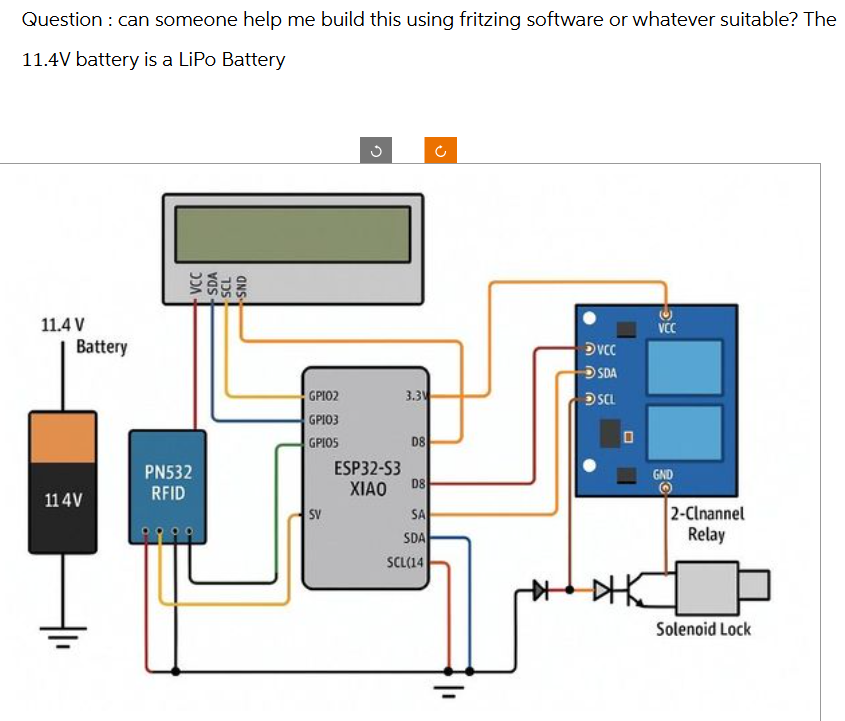 Question : can someone help me build this using fritzing software or whatever suitable? The
11.4V battery is a LiPo Battery
1.4V ~ VC
Battery pl
550A
GPI02 33 Ise
=
POS 08 8
PN532 ESP32-53 Ld aD
RFID Xiao" ©
Rl 2-Clnannel
D Relay
SCLa4|
HC
—— Solenoid Lock
Question : can someone help me build this using fritzing software or whatever suitable? The
11.4V battery is a LiPo Battery
1.4V ~ VC
Battery pl
550A
GPI02 33 Ise
=
POS 08 8
PN532 ESP32-53 Ld aD
RFID Xiao" ©
Rl 2-Clnannel
D Relay
SCLa4|
HC
—— Solenoid Lock
This is AI generated Response.
Asked by: mohit
Created at: 2025-07-08 09:54:12
Asked by: mohit
Created at: 2025-07-08 09:54:12
Final Answer:
Rendered
Raw Text
Did you like this answer?
Certainly! Let's **break down the circuit** and explain **how to build it** in Fritzing or any other similar prototyping software. Here’s a **step-by-step guide** and some important **notes** regarding the 11.4V LiPo battery:
---
### **Step 1: Understand the Components**
- **11.4V LiPo Battery** (Power source)
- **PN532 RFID Module** (for RFID reading)
- **ESP32-S3 XIAO** (main microcontroller)
- **2-Channel Relay Module** (to switch high-current devices)
- **Solenoid Lock** (actuator, controlled by relay)
- **LCD Display** (for output)
---
### **Step 2: Power Considerations**
The **ESP32-S3 XIAO** and modules typically operate at **3.3V or 5V**.
**Directly using 11.4V** from the battery will **damage** your modules.
**Solution:** Use a **DC-DC buck converter** (not shown in the diagram) to step down 11.4V to 5V or 3.3V for your circuits.
---
### **Step 3: Wiring (As per Diagram)**
#### **Power Lines**
- **Battery GND (black wire):** Connects to GND rails of all modules.
- **Battery Positive (orange wire):** Should go through a **buck converter** to provide 5V/3.3V to VCC of all modules.
#### **RFID (PN532)**
- **VCC:** Connect to 3.3V/5V (from buck converter, NOT directly to 11.4V).
- **GND:** To common ground.
- **SDA/SCL:** Connect to ESP32-S3 XIAO (I2C pins, usually SDA/SCL).
#### **ESP32-S3 XIAO**
- **VCC/3.3V:** From buck converter.
- **GND:** Common ground.
- **SDA/SCL:** To PN532 and LCD (shared I2C bus).
- **GPIO pins (for relay control):** As shown (e.g., GPIO5/D8).
#### **LCD Display**
- **VCC:** From buck converter.
- **GND:** Common ground.
- **SDA/SCL:** To ESP32-S3 XIAO (I2C lines).
#### **Relay Module**
- **VCC:** From buck converter.
- **GND:** Common ground.
- **Control Pin:** From ESP32 GPIO (as in diagram).
- **Relay Output:** Switches power to the solenoid lock.
#### **Solenoid Lock**
- **Power:** From relay output (make sure it’s rated for 11.4V if powered directly from battery).
- **Diode:** Place a flyback diode (as shown) across the solenoid lock terminals to protect against voltage spikes.
---
### **Step 4: Building in Fritzing**
1. **Open Fritzing.**
2. **Drag and drop components:** Battery, ESP32, PN532, LCD, Relay, Diode, Solenoid, and necessary buck converter.
3. **Wire as per diagram:** Pay special attention to power lines (use a buck converter).
4. **Label each connection** as in the diagram for clarity.
5. **Double-check I2C lines:** SDA/SCL must be shared but not swapped.
6. **Save your schematic** for future reference.
---
### **Final Answer & Notes**
- **Always use a buck converter** to step down from 11.4V to 5V/3.3V for your microcontroller and modules.
- **Connect all grounds together** to ensure a common reference.
- **Do not connect 11.4V directly** to any module except the solenoid (if it supports that voltage).
- **Relay control:** The relay isolates the high voltage (solenoid) from your low-voltage logic.
---
#### **Summary Table of Key Connections:**
| Component | VCC | GND | Data/Control Pins |
|------------------|-----------|----------|-------------------------------|
| ESP32-S3 XIAO | 3.3V/5V | GND | SDA, SCL, Relay Control GPIO |
| PN532 RFID | 3.3V/5V | GND | SDA, SCL |
| LCD Display | 3.3V/5V | GND | SDA, SCL |
| Relay Module | 3.3V/5V | GND | GPIO from ESP32 |
| Solenoid Lock | 11.4V (via relay) | GND | - |
---
**If you need a ready-made Fritzing schematic, you can use these steps to replicate the exact wiring shown in the image.**
**Remember:** The most important safety note is to **never power the modules directly with 11.4V**—always step it down!
---
If you get stuck in Fritzing or need a specific part, let me know!
📢 Instructions:
- Ask anything relatd to above question only.
- For new Question goto :