 VIPSolutions
Give step-by-step solution with explanation and final answer:the standard view of the orthographic projections. j I il Ord iil ; fl Pref ml PN Eh Nm a TINE hE eR ib ENA if | iE si NE rE TENG RE Sarl ae 8 ag] pn me Th LE BRE se, al HEE gy Lh hy po LLL I
Question:
Give step-by-step solution with explanation and final answer: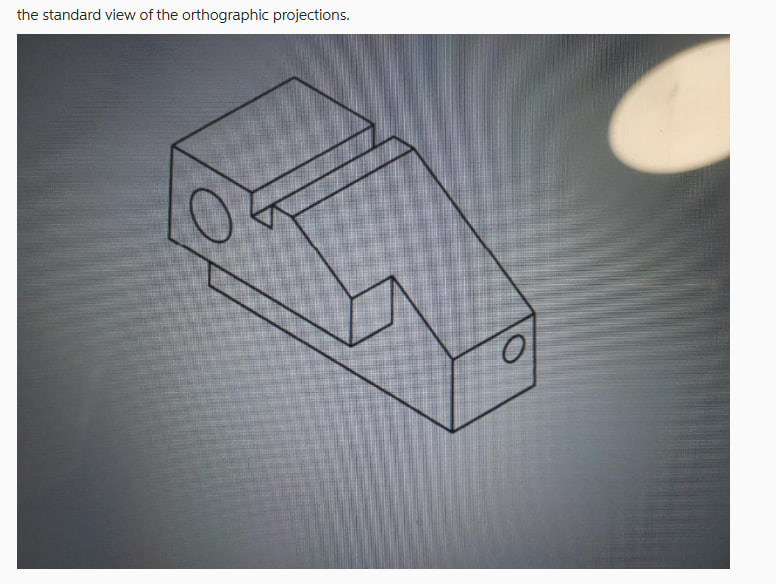 the standard view of the orthographic projections.
j I
il
Ord iil
; fl
Pref ml
PN
Eh Nm a
TINE
hE eR ib
ENA if | iE
si NE rE TENG RE
Sarl ae 8 ag]
pn me Th LE
BRE se, al HEE
gy Lh hy po
LLL
I
the standard view of the orthographic projections.
j I
il
Ord iil
; fl
Pref ml
PN
Eh Nm a
TINE
hE eR ib
ENA if | iE
si NE rE TENG RE
Sarl ae 8 ag]
pn me Th LE
BRE se, al HEE
gy Lh hy po
LLL
I
This is AI generated Response.
Asked by: Alok Kumar
Created at: 2026-01-25 06:00:33
Asked by: Alok Kumar
Created at: 2026-01-25 06:00:33
Final Answer:
Rendered
Raw Text
Did you like this answer?
# Step-by-Step Solution: Drawing Orthographic Projections
Given: An isometric view of a mechanical part.
We are to draw the standard views of orthographic projections:
- **Front View**
- **Top View**
- **Right Side View**
Let's break down the steps:
---
## **Step 1: Analyze the Isometric View**
**Key Features:**
- Rectangular base
- Step-like upper feature
- Two holes (one on the left face, one on the right face)
- Notch/cutout on the top
---
## **Step 2: Decide View Orientation**
### **Front View:**
- Typically, the most descriptive side is chosen as the front.
- For this part, the face with the slanted and stepped features (the rightmost face in the image) is a good candidate for the front view.
### **Top View:**
- Projected directly above the front view, showing the shape of the cutout/notch.
### **Right Side View:**
- Projected to the right of the front view, showing the side with the hole.
---
## **Step 3: Draw the Front View**
- Draw the overall rectangular outline as seen from the front.
- Show the slope and the step.
- Include the visible edges and the hole on the right face as a circle.
---
## **Step 4: Draw the Top View**
- Project lines vertically from the front view.
- Show the rectangular top shape with the notch/cutout.
- The holes may appear as rectangles or hidden lines, depending on their placement.
---
## **Step 5: Draw the Right Side View**
- Project horizontally from the front view.
- Show the step and the notch from the side.
- The left face hole appears as a circle.
---
## **Step 6: Add Hidden Lines**
- Use dashed lines to show features not visible in each view (like holes or cutouts that are not visible in that orientation).
---
## **Step 7: Final Orthographic Projection Layout**
```
[Top View]
-----------------------
| |
| Notch/Cutout |
| |
-----------------------
|
v
[Front View] ------> [Right Side View]
----------------- -----------------
| Step & Slope | | Side Profile |
| Hole (circle) | | Hole (circle) |
----------------- -----------------
```
---
# **Final Answer:**
**You should draw the three orthographic views as follows:**
1. **Front View:** Shows the stepped profile, the slope, and the right face hole as a circle.
2. **Top View:** Shows the rectangular outline and the notch/cutout.
3. **Right Side View:** Shows the side profile, the step, and the hole in the left face as a circle.
**Remember:**
- Align the views properly.
- Use solid lines for visible edges, dashed for hidden.
- Clearly represent holes as circles in the correct views.
---
## **Sketch Example** (Text Representation)
```
Top View
____________
| |
| ______ |
| | | |
|__|______|__|
Front View Right Side View
____________ __________
| o | | o|
| ____ | | ____ |
| | | | | | | |
|__|____|____| |__|____|_|
```
- `o` represents the hole as seen in that view.
---
If you need a detailed hand-drawn or CAD sketch, please let me know!
📢 Instructions:
- Ask anything relatd to above question only.
- For new Question goto :