 VIPSolutions
Give step-by-step solution with explanation and final answer:BORNE nb, Part 6 Build the following part in SOLIDWORKS. «Unit System: MMGS (millimeter, gram, second) + Decimal Places: 3 «Part Origin: As shown in the drawing views below and the part should match the Isometric View shown. * Material: Copper « Density = 0.0089 g/mm?® 15x 4 12 20 20x 4 15 15 20 20 RI0X2 —— |= 100 —=f \ 15 20 200 ®100 30 30 | 160 30 30
Question:
Give step-by-step solution with explanation and final answer: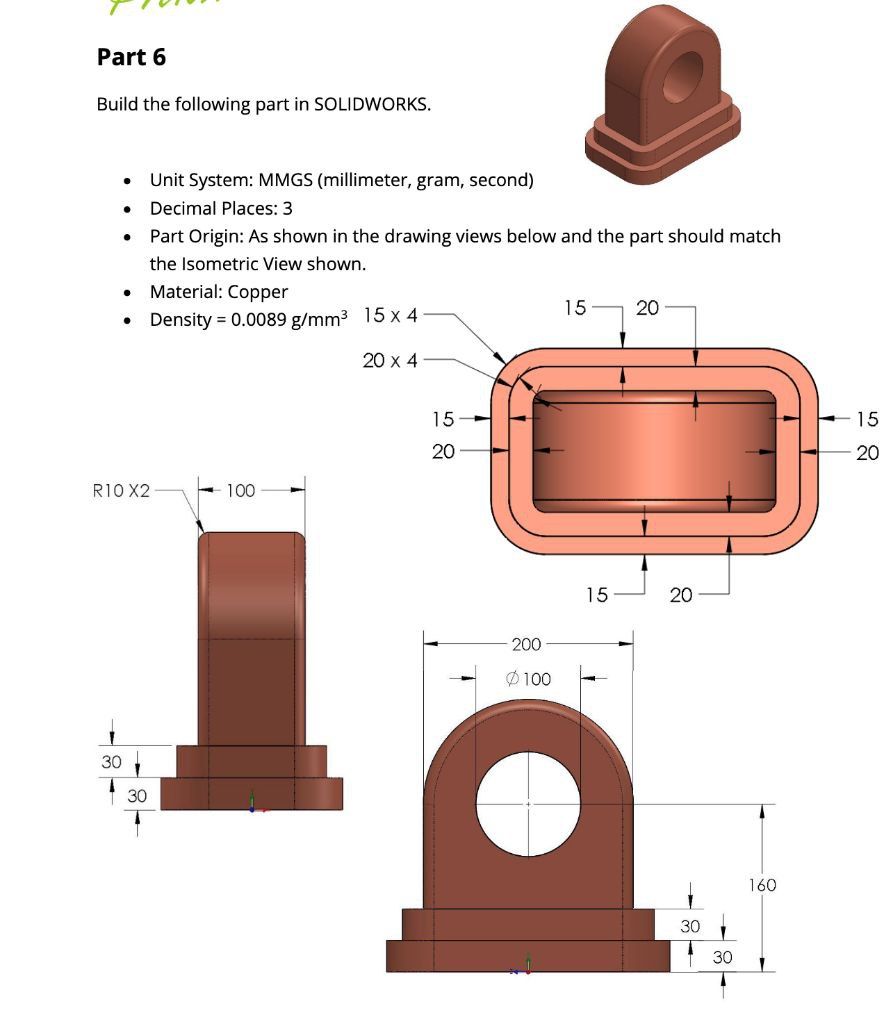 BORNE nb,
Part 6
Build the following part in SOLIDWORKS.
«Unit System: MMGS (millimeter, gram, second)
+ Decimal Places: 3
«Part Origin: As shown in the drawing views below and the part should match
the Isometric View shown.
* Material: Copper
« Density = 0.0089 g/mm?® 15x 4 12 20
20x 4
15 15
20 20
RI0X2 —— |= 100 —=f
\
15 20
200
®100
30
30
| 160
30
30
BORNE nb,
Part 6
Build the following part in SOLIDWORKS.
«Unit System: MMGS (millimeter, gram, second)
+ Decimal Places: 3
«Part Origin: As shown in the drawing views below and the part should match
the Isometric View shown.
* Material: Copper
« Density = 0.0089 g/mm?® 15x 4 12 20
20x 4
15 15
20 20
RI0X2 —— |= 100 —=f
\
15 20
200
®100
30
30
| 160
30
30
This is AI generated Response.
Asked by: Rahul
Created at: 2026-01-11 19:32:32
Asked by: Rahul
Created at: 2026-01-11 19:32:32
Final Answer:
Rendered
Raw Text
Did you like this answer?
# Step-by-Step Solution for SolidWorks Model (Part 6)
Let's break down the model creation based on the provided drawing and dimensions.
---
## 1. **Setting Up the Units**
- Open SolidWorks.
- Set the **Unit System** to **MMGS** (millimeter, gram, second).
---
## 2. **Sketch the Base**
### a. **Create the Outer Base**
1. **Front Plane** → **Sketch**.
2. Draw a **rectangle** with rounded corners (fillet radius = 20 mm).
- **Overall size:** 200 mm (width) x 100 mm (height).
- Add corner fillets of **20 mm**.
### b. **Extrude the Base**
- **Extrude Boss/Base**: Set thickness to **30 mm**.
---
## 3. **Sketch the Inner Base**
1. **Top face of the base** → **Sketch**.
2. **Inner rectangle**: 170 mm x 70 mm (calculated as 200-2×15 by 100-2×15).
- Add corner fillets of **15 mm**.
3. **Extrude**: **30 mm** (this creates the step).
---
## 4. **Create the Vertical Boss**
### a. **Sketch the Upright Section**
1. **Front plane** → **Sketch**.
2. Draw a **rectangle**: 100 mm (width) x 130 mm (height).
- Centered on the base (so 50 mm on each side of the base center).
- The bottom of this rectangle should sit on top of the upper base (thus, the bottom is at Z = 60 mm from the part origin).
3. Add a **semicircle** (radius 100 mm) on top of the rectangle (so the total height = 130 mm rectangle + 100 mm semicircle = 230 mm, but the drawing shows only 160 mm total height from the base step up).
- Adjust the center of the semicircle to be at the top of the rectangle.
- The overall height from the bottom (including both steps) is **160 mm**.
### b. **Extrude the Boss**
- **Extrude**: **30 mm** (to match the thickness in the side view).
---
## 5. **Add the Hole**
1. **Front face of vertical boss** → **Sketch**.
2. Draw a **circle** of diameter **100 mm**.
- Centered horizontally and vertically in the upper portion.
3. **Extruded Cut**: Through all.
---
## 6. **Add Fillets**
- Add **edge fillets** of **10 mm** to the two front top corners of the boss (as indicated by R10 X2).
---
## 7. **Apply Material**
- **Right-click part → Material → Copper**.
- Set **Density:** .0089 g/mm³ (if needed).
---
## 8. **Check Decimal Places**
- Go to **Document Properties → Units** and set decimal places to **3**.
---
## 9. **Final Checks**
- **Verify dimensions** match the drawing.
- The part origin as per the drawing should be at the center of the bottom face.
---
# **Summary Table of Dimensions**
| Feature | Dimension (mm) |
|---------------------|---------------|
| Base (outer) | 200 x 100 |
| Base (inner step) | 170 x 70 |
| Base thickness | 30 |
| Vertical boss width | 100 |
| Vertical boss height| 160 |
| Boss thickness | 30 |
| Hole diameter | 100 |
| Corner fillets | 20 (base), 15 (step), 10 (boss) |
---
## **Your Final Part Should Look Like This:**
- Two-stepped rectangular base with filleted corners,
- Vertical boss with a large central hole,
- All dimensions and fillets as specified.
---
**This step-by-step guide will help you build the part in SolidWorks as per the provided drawing. If you need the SolidWorks feature tree or further clarification, let me know!**
📢 Instructions:
- Ask anything relatd to above question only.
- For new Question goto :