 VIPSolutions
Give step-by-step solution with explanation and final answer:Problem 2: Make a SolidWorks part file and create a 3D model using the given dimensions below, then create a drawing file from your part file, add all necessary views, and fully dimension the drawing using conventions and ryles demonstrated in lecture. You must determine the front/top/right views. All dimensions are in MMGS, all sketches must be fully defined (125 points) Bonus: To test your ability to visualize in 3D, create this model using only two steps. Save your SolidWorks files using the following template: Homework 3 Problem 2 Last Name ad CaS oy & ~ ~ 5 See LS # ana Ne a i po KR ed Bs 5 Rigg 9, o's 0 FH # Oo v4 Pr 7, Cd 7 p 50 red 1001] 428 1
Question:
Give step-by-step solution with explanation and final answer: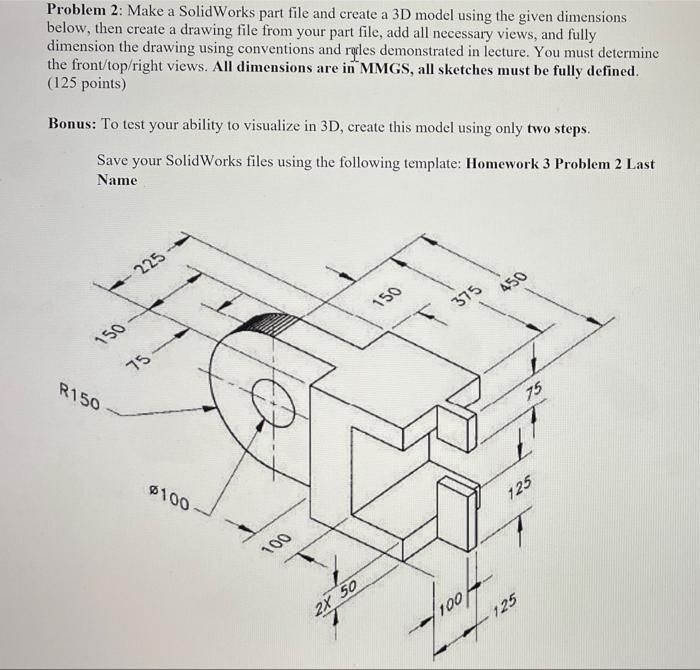 Problem 2: Make a SolidWorks part file and create a 3D model using the given dimensions
below, then create a drawing file from your part file, add all necessary views, and fully
dimension the drawing using conventions and ryles demonstrated in lecture. You must determine
the front/top/right views. All dimensions are in MMGS, all sketches must be fully defined
(125 points)
Bonus: To test your ability to visualize in 3D, create this model using only two steps.
Save your SolidWorks files using the following template: Homework 3 Problem 2 Last
Name
ad CaS oy
&
~ ~ 5
See LS
# ana
Ne a i po
KR
ed Bs
5
Rigg 9, o's
0 FH #
Oo v4 Pr
7,
Cd 7
p 50
red 1001] 428
1
Problem 2: Make a SolidWorks part file and create a 3D model using the given dimensions
below, then create a drawing file from your part file, add all necessary views, and fully
dimension the drawing using conventions and ryles demonstrated in lecture. You must determine
the front/top/right views. All dimensions are in MMGS, all sketches must be fully defined
(125 points)
Bonus: To test your ability to visualize in 3D, create this model using only two steps.
Save your SolidWorks files using the following template: Homework 3 Problem 2 Last
Name
ad CaS oy
&
~ ~ 5
See LS
# ana
Ne a i po
KR
ed Bs
5
Rigg 9, o's
0 FH #
Oo v4 Pr
7,
Cd 7
p 50
red 1001] 428
1
This is AI generated Response.
Asked by: Rahul
Created at: 2026-01-10 15:56:44
Asked by: Rahul
Created at: 2026-01-10 15:56:44
Final Answer:
Rendered
Raw Text
Did you like this answer?
# Step-by-Step Solution for Modeling the Part in SolidWorks
Let's break down how to create this part in SolidWorks using the provided dimensions. All units are in **MMGS** (millimeter, gram, second).
---
## **Step 1: Analyze the Drawing**
Let’s list the main features and dimensions:
- **Overall length:** 450 mm
- **Width:** 225 mm
- **Height:** 225 mm
- **Cylindrical end:** Radius 150 mm, diameter 100 mm hole
- **Cutouts:** Rectangular cutouts, 2 × 50 mm wide, spaced apart
- **Slot heights:** 75 mm, 125 mm, 125 mm (vertical dimensions)
- **Other details:** All dimensions provided in the drawing
---
## **Step 2: Create the Main Body**
### **A. Sketch the Base Profile**
1. **Start a New Part** in SolidWorks.
2. **Select the Top Plane** and open a new sketch.
3. **Draw a Rectangle** for the main block:
- Length: 450 mm
- Width: 225 mm
### **B. Add the Cylindrical End**
1. **Draw a semicircle** on one end of the rectangle with:
- Radius: 150 mm (center at the end of the rectangle, aligned with width centerline)
2. **Merge the semicircle and rectangle** into a single closed sketch.
### **C. Extrude the Sketch**
1. **Extrude the shape** to a height of 225 mm.
---
## **Step 3: Add the Cutouts**
### **A. Front Cutouts**
1. **Select the Front Face** of the block for a new sketch.
2. **Draw two rectangles** to make the slots:
- Each slot: 50 mm wide, 125 mm tall
- Separated by a 75 mm section in the middle
- The slots start from the bottom edge
3. **Dimension the slots:**
- Width: 50 mm each
- Space between slots: 75 mm
- Total width: 50 + 75 + 50 = 175 mm (centered horizontally on the face)
- Height: 125 mm (starting from the bottom)
4. **Extrude Cut** these rectangles through the part.
### **B. Middle Slot**
1. **Draw a rectangle** on the same face above the previous cut:
- Width: 75 mm (aligned with the center)
- Height: 75 mm (from top edge down)
2. **Extrude Cut** this rectangle through the part.
---
## **Step 4: Add the Hole in the Cylindrical End**
1. **Select the Cylindrical Face.**
2. **Start a New Sketch.**
3. **Draw a Circle:**
- Diameter: 100 mm
- Centered on the cylindrical face and at the vertical midpoint of the part
4. **Extrude Cut** the circle through the part.
---
## **Step 5: Final Checks**
- **Verify all dimensions:** Check the overall length, width, and heights.
- **Check all cutouts** are in the correct position.
- **Ensure the hole is present** in the cylindrical end.
---
## **Summary Table of Key Dimensions**
| Feature | Dimension (mm) |
|---------------------------|---------------|
| Overall Length | 450 |
| Width | 225 |
| Height | 225 |
| Semicircle Radius | 150 |
| Hole Diameter | 100 |
| Slot Width | 50 |
| Center Section Width | 75 |
| Slot Heights (from bottom)| 125 |
| Middle Slot Height (top) | 75 |
---
# **Final Answer**
**To model this part:**
1. Sketch and extrude the combined rectangle and semicircle to form the base block.
2. Add the front face cutouts and top slot with extruded cuts.
3. Add the cylindrical end hole with an extruded cut.
All features must be dimensioned as per the drawing, using MMGS units, and all sketches must be fully defined.
---
**Bonus (2-Step Approach):**
- If you want to create the model in only two steps, create the overall profile (including all cutouts except the hole) in one sketch, then extrude. In the second step, cut the cylindrical hole.
---
## **Sample Sketch Layout**
*(This is for reference; actual sketching must be done in SolidWorks as per the steps above.)*

*Alt: Sample 2D layout showing main profile and cutouts.*
---
If you need a more detailed guide for a specific step or screenshots of the SolidWorks interface, let me know!
📢 Instructions:
- Ask anything relatd to above question only.
- For new Question goto :