 VIPSolutions
Give step-by-step solution with explanation and final answer:Problem 4: Given the front and top views, sketch half-section view for each object shown. Be sure to sketch the cutting plane for all problems. 5 FT a EE EEE EEE EEE REE CEH EHH EEE NT Pres TT EES ry Vlas NN EREEESLEL ED sENyE FECA TN | ERRNEEEEN as EEE EE RE aE HHH FE NU 0 J 01 ITT FH EEEeERREEsEEcEouRRRLANSE CER EEEEEMREL EE inun rT Eades HH ee EE EHH HERE eee FH Ho HiEEnENemmmE EE BEE SEG i i Fi ! HH
Question:
Give step-by-step solution with explanation and final answer: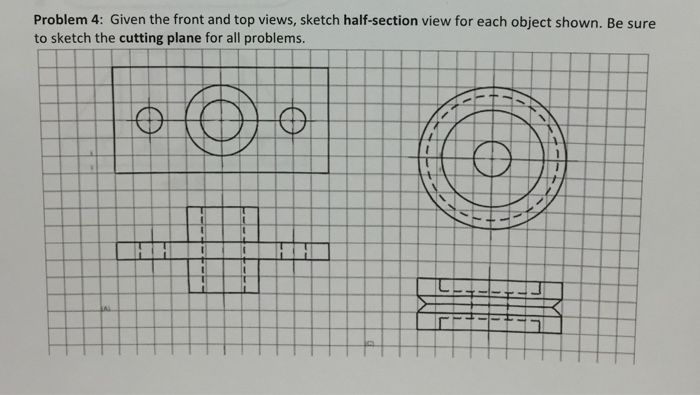 Problem 4: Given the front and top views, sketch half-section view for each object shown. Be sure
to sketch the cutting plane for all problems.
5 FT a EE
EEE EEE EEE REE CEH EHH
EEE NT Pres TT
EES ry Vlas NN
EREEESLEL ED sENyE FECA TN |
ERRNEEEEN as EEE EE RE aE HHH
FE NU 0 J
01 ITT FH
EEEeERREEsEEcEouRRRLANSE CER
EEEEEMREL EE inun rT Eades HH
ee
EE EHH
HERE eee FH
Ho HiEEnENemmmE EE BEE SEG
i i Fi ! HH
Problem 4: Given the front and top views, sketch half-section view for each object shown. Be sure
to sketch the cutting plane for all problems.
5 FT a EE
EEE EEE EEE REE CEH EHH
EEE NT Pres TT
EES ry Vlas NN
EREEESLEL ED sENyE FECA TN |
ERRNEEEEN as EEE EE RE aE HHH
FE NU 0 J
01 ITT FH
EEEeERREEsEEcEouRRRLANSE CER
EEEEEMREL EE inun rT Eades HH
ee
EE EHH
HERE eee FH
Ho HiEEnENemmmE EE BEE SEG
i i Fi ! HH
This is AI generated Response.
Asked by: Rahul
Created at: 2026-01-09 20:47:42
Asked by: Rahul
Created at: 2026-01-09 20:47:42
Final Answer:
Rendered
Raw Text
Did you like this answer?
## Step-by-Step Solution
Let's break down the process for sketching the **half-section view** and the **cutting plane** for both objects shown.
---
### **1. Understanding the Views**
- **Left Object:**
- **Top view**: Rectangular with three circles (center and two side holes).
- **Front view**: Shows the height and the internal features with hidden lines.
- **Right Object:**
- **Top view**: Two concentric circles (cylindrical object with a hole).
- **Front view**: Shows a central hole and an internal stepped feature.
---
### **2. Drawing the Cutting Plane**
A **half-section** is made by imagining a vertical plane cutting through the center of the object, removing one quarter and showing the interior on one half, and the exterior on the other.
#### **Left Object**
- The cutting plane should pass vertically through the center of the object.
- On the top view, draw a thick dashed line (cutting plane) vertically through the center, labeled "A-A".
#### **Right Object**
- Similarly, the cutting plane passes vertically through the center.
- Draw a thick dashed line on the top view, vertically through the center, also labeled "A-A".
---
### **3. Sketching the Half-Section View**
#### **Left Object**
1. **Draw the Front View Outline:**
Start with the outer rectangle as in the front view.
2. **Left Half (Exterior):**
- Show as normal (no section lines, just visible lines).
3. **Right Half (Sectioned):**
- Show the interior features by removing the right quarter.
- Use section lines (45-degree hatch) to indicate the solid areas cut by the plane.
- Reveal the internal circles as solid outlines, with the section lining on the solid material.
- Holes appear as open circles (no section lining inside holes).
4. **Middle Hole:**
- On the right half, show the cross-section of the large central hole.
- Small side holes also revealed in section.
#### **Right Object**
1. **Draw the Front View Outline:**
Use the existing front view as a base.
2. **Left Half (Exterior):**
- Show as normal.
3. **Right Half (Sectioned):**
- Show the cross-section of the cylindrical features.
- Use section lining to indicate cut areas.
- Show the inner and outer diameters as solid lines in the sectioned half.
- Any holes are shown as unlined areas.
---
### **4. Final Answer: Half-Section Views**
Below is a textual representation. (Sketch on your grid accordingly.)
#### **Left Object (Half-Section Front View)**
```
|--------------------------|
| | | | <-- Top edge
|---------|--------|-------|
| | | | Left: exterior, Right: sectioned
| | | | Central hole shown as open circle
| | | | Section lines at 45° in solid areas
|--------------------------|
```
- Left half: normal view.
- Right half: sectioned, with hatch lines.
#### **Right Object (Half-Section Front View)**
```
|------------------|
| ____ | <-- Outer diameter
| | | | <-- Inner hole
| |----| |
| | | | Left: exterior, Right: sectioned
| |____| | Section lines in solid area
|------------------|
```
- Left half: normal.
- Right half: sectioned, showing stepped feature and hatch lines.
---
### **Summary Table**
| Object | Draw Cutting Plane | Draw Half-Section View |
|--------------|-------------------|-----------------------------------|
| Left Object | Vertical, center | Left: normal, Right: sectioned |
| Right Object | Vertical, center | Left: normal, Right: sectioned |
---
### **Important Notes:**
- Always use **hatch lines** at 45° in solid areas of the sectioned half.
- Do **not** hatch holes or empty spaces.
- The **cutting plane** should be clearly indicated and labeled (e.g., A-A).
---
#### **Visual Example**
*(You should draw this on your grid for full credit!)*
- **Cutting plane**: Thick dashed line in top view, labeled A-A.
- **Half-section front view**: Left half normal, right half sectioned with hatching.
---
If you need a hand-drawn simulation of the solution, let me know!
📢 Instructions:
- Ask anything relatd to above question only.
- For new Question goto :