 VIPSolutions
Give step-by-step solution with explanation and final answer:Sketch the isometric view from a given orthographic views | 1 3 . Rd ae Tm HRP an SCRE A RACES ERE RR Co 0 co GR rh eae SR ee 0 0 Ea
Question:
Give step-by-step solution with explanation and final answer: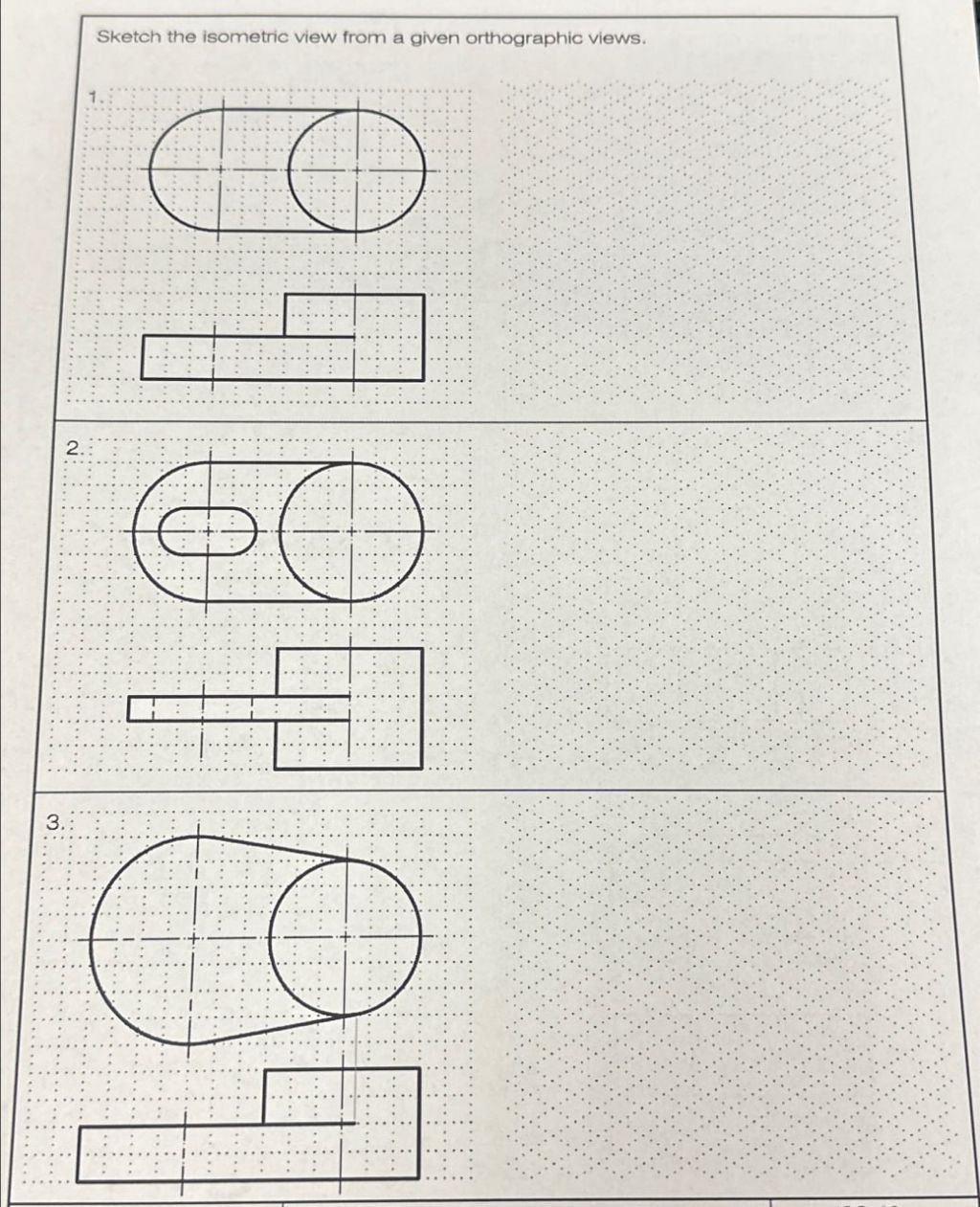 Sketch the isometric view from a given orthographic views |
1 3 .
Rd ae Tm
HRP an SCRE
A RACES ERE RR Co 0 co GR
rh eae SR ee 0 0 Ea
Sketch the isometric view from a given orthographic views |
1 3 .
Rd ae Tm
HRP an SCRE
A RACES ERE RR Co 0 co GR
rh eae SR ee 0 0 Ea
This is AI generated Response.
Asked by: Rahul
Created at: 2026-01-01 19:19:32
Asked by: Rahul
Created at: 2026-01-01 19:19:32
Final Answer:
Rendered
Raw Text
Did you like this answer?
Let's break down to convert eachographic view to an isometric sketch step by step.
---
## Problem Analysis
Each problem shows two orthographic views (top and front), and you are to sketch the 3D isometric view on the right grid.
---
## General Steps
1. **Analyze the Views**: Identify key shapes (rectangles, circles, cutouts) and their relationships.
2. **Map Dimensions**: Transfer lengths, widths, and heights from orthographic to isometric.
3. **Draw the Isometric Base Box**: Outline the overall bounding box in isometric.
4. **Add Features**: Project and draw features (circles, cutouts) in correct isometric positions.
5. **Finalize**: Add details and check proportions.
---
## Step-by-Step Solution
### **1. First Figure**
#### **Step 1: Analyze Orthographic Views**
- **Top view:** Left side has a semicircle, right side has a full circle.
- **Front view:** Shows two heights, left part lower, right part higher.
#### **Step 2: Draw Isometric Base Box**
- Draw a rectangular box in isometric corresponding to the total width and depth.
#### **Step 3: Add Main Volumes**
- Left part: Lower height, semicircular front.
- Right part: Higher, circular top.
#### **Step 4: Add Circles**
- Draw isometric ellipses for the semicircle and full circle.
#### **Step 5: Finalize**
- Darken outlines, erase guidelines.
---
### **2. Second Figure**
#### **Step 1: Analyze Orthographic Views**
- **Top view:** Left side has an oval slot inside a semicircle, right side a circle.
- **Front view:** Shows a protruding slot on the left, blocky right side.
#### **Step 2: Draw Isometric Base Box**
- Sketch the total bounding box in isometric.
#### **Step 3: Draw Main Volumes**
- Left: Thin, protruding slot with semi-circular end.
- Right: Raised block with circular top.
#### **Step 4: Add Details**
- Draw isometric ellipses for circles and slot.
---
### **3. Third Figure**
#### **Step 1: Analyze Orthographic Views**
- **Top view:** Left side is a semi-ellipse that blends into a circle on the right.
- **Front view:** Stepped elevation, left lower, right higher.
#### **Step 2: Draw Isometric Base Box**
- Draw the bounding box for the stepped shape.
#### **Step 3: Draw Main Volumes**
- Left: Lower step with semi-ellipse.
- Right: Higher block with a circle.
#### **Step 4: Add Features**
- Draw ellipses for the circle and semi-ellipse.
---
## **Summary Table**
| Step | Action |
|------------|---------------------------------------------------------------------------------------------|
| 1 | Analyze the top and front views for key shapes and heights |
| 2 | Draw the isometric bounding box for the object |
| 3 | Sketch the main volumes based on height and width/depth |
| 4 | Mark and draw circles/slots as ellipses in isometric |
| 5 | Darken outlines, clean up the sketch |
---
## **Isometric Drawing Tips**
- **Use the dotted grid**: Align lines to isometric angles (30° from horizontal).
- **Circles become ellipses**: Use the four-point ellipse method if needed.
- **Keep proportions**: Double check measurements from orthographic to isometric.
---
### **Sample Isometric for Figure 1 (ASCII Example)**
```
_______
/ /|
/_______ / |
| | |
| | /
|_______| /
```
*This is a simplified view—use your grid for accuracy and reference the steps above!*
---
**If you need a specific isometric view drawn for any of the figures, let me know and I can guide you through drawing it on paper or with software!**
📢 Instructions:
- Ask anything relatd to above question only.
- For new Question goto :