 VIPSolutions
give answer in 2 step with explanation at the end of each step and final answer at the end:Problema #3 (30 pe, bedi dd Ld Nom. Est: mins, Soe do evlusén, a db proves oud scan 11 izando los -) 47h SUPPORTED Se) = ER rs = \\ ALT 7 b 15/16" DIAMETER SEY CO Ra \ AUN
Question:
give answer in 2 step with explanation at the end of each step and final answer at the end: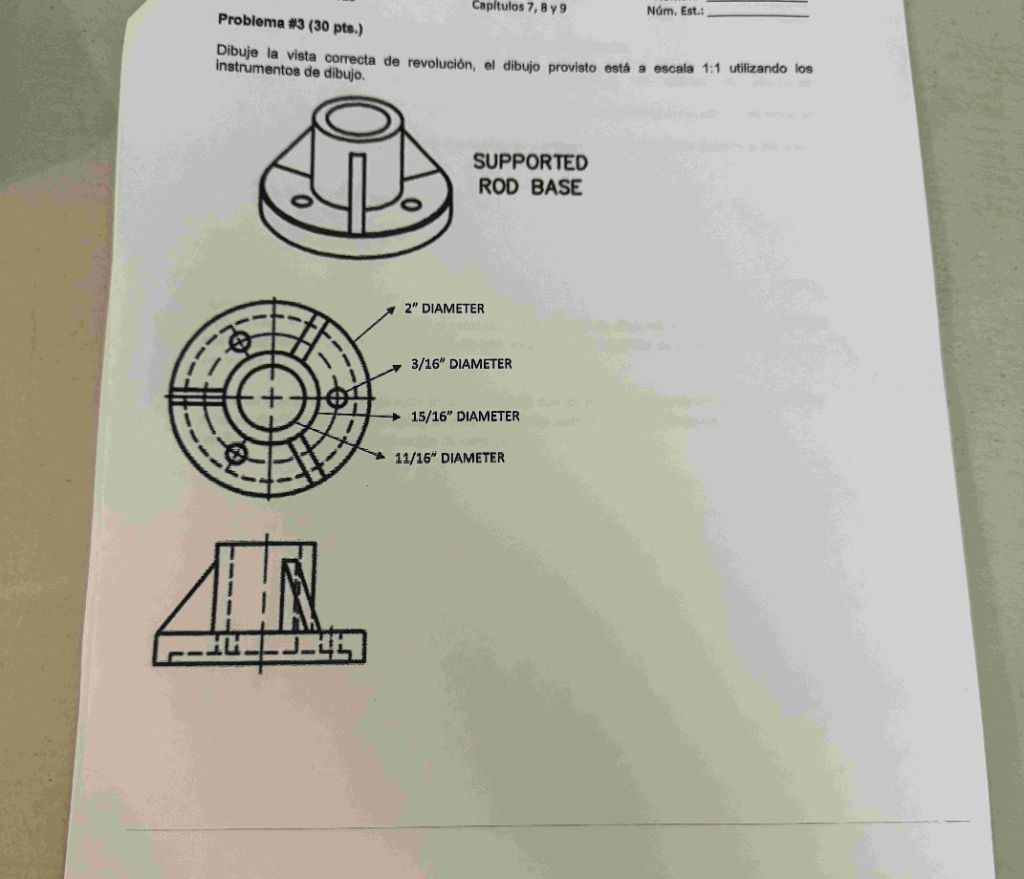 Problema #3 (30 pe, bedi dd Ld Nom. Est:
mins, Soe do evlusén, a db proves oud scan 11 izando los
-)
47h SUPPORTED
Se) =
ER
rs =
\\ ALT 7 b 15/16" DIAMETER
SEY CO Ra
\
AUN
Problema #3 (30 pe, bedi dd Ld Nom. Est:
mins, Soe do evlusén, a db proves oud scan 11 izando los
-)
47h SUPPORTED
Se) =
ER
rs =
\\ ALT 7 b 15/16" DIAMETER
SEY CO Ra
\
AUN
This is AI generated Response.
Asked by: Rahul
Created at: 2025-12-17 15:30:47
Asked by: Rahul
Created at: 2025-12-17 15:30:47
Final Answer:
Rendered
Raw Text
Did you like this answer?
# Step 1: Analyze the Given Views
The image shows a mechanical part called a "Supported Rod Base" with two main views:
- **Top View (Plan)**
- **Front View (Elevation or Section)**
**Top View Details:**
- Multiple concentric circles (representing different diameters: 2", 15/16", 11/16")
- Bolt holes (3/16" diameter) spaced around the base
**Front View Details:**
- Shows the side profile with height and support ribs
- Dashed lines indicate hidden features (holes, internal diameters)
**Explanation:**
By examining both views, you understand the geometry and spatial relationships of the part’s features (holes, diameters, and supports).
---
# Step 2: Draw the Correct Revolution View
To draw the **revolution view** (rotational or sectional view):
1. **Project the Profile:** Use the front view (side profile) as the basis for rotation.
2. **Revolve the Contour:** Imagine rotating this profile 360° around its central vertical axis. This will generate the solid form of the part, showing how the cylindrical and circular features blend together.
- The outermost profile will form the base diameter (2").
- The inner cylinders will form the central hole (11/16") and the raised boss (15/16").
- The holes (3/16") will appear as small circles or as hidden lines in the sectional view.
**Explanation:**
The revolution view is a cross-sectional side view that reveals all internal and external features as if the part were sliced and rotated. This is especially useful for understanding complex cylindrical parts.
---
# Final Answer
To create the correct revolution view:
- Use the side (front) profile and rotate it around the center axis.
- Show all diameters and holes in correct proportions.
- The resulting view will clearly display the internal/external cylindrical features and their spatial arrangement.
**Summary:**
Analyzing the given orthographic views allows you to project and sketch the revolution view, providing a clear understanding of the part’s full geometry.
Question:
Graf ke sath solve karo
This is AI generated Response.
Asked by: Rahul
Created at: 2025-12-17 15:31:39
Asked by: Rahul
Created at: 2025-12-17 15:31:39
Final Answer:
Rendered
Raw Text
Did you like this answer?
# Step 1: Analyze the Given Views
The image represents a mechanical part known as a "Supported Rod Base" with two distinct views:
- **Top View (Plan)**
- **Front View (Elevation or Section)**
### Top View Details:
- **Concentric Circles:** Represent various diameters:
- **2 inches** (outermost)
- **15/16 inches** (middle)
- **11/16 inches** (innermost)
- **Bolt Holes:** 3/16 inch diameter, evenly spaced around the base.
### Front View Details:
- **Side Profile:** Shows the height and any supporting ribs.
- **Dashed Lines:** Indicate hidden features such as holes or internal diameters.
**Explanation:**
This analysis helps understand the geometry and spatial relationships of the part’s features, including the arrangement of holes and varying diameters.
---
# Step 2: Draw the Correct Revolution View
To create the **revolution view**:
1. **Project the Profile:** Utilize the front view as the reference for rotation.
2. **Revolve the Contour:** Imagine rotating the front profile 360° around its vertical axis. This will visualize the solid form of the part, illustrating how the cylindrical and circular features integrate.
### Key Features:
- **Base Diameter:** 2 inches (outermost)
- **Central Hole:** 11/16 inch (innermost)
- **Raised Boss:** 15/16 inch (middle)
- **Holes:** 3/16 inch appear as small circles or hidden lines in the sectional view.
**Explanation:**
The revolution view serves as a cross-sectional side view, displaying all internal and external features as if the part were sliced and rotated. This method is crucial for understanding complex cylindrical parts.
---
# Final Answer
To successfully create the revolution view:
- Use the side (front) profile and rotate it around the center axis.
- Accurately represent all diameters and holes in correct proportions.
The resulting view will effectively depict the internal and external cylindrical features along with their spatial arrangement.
**Summary:**
By analyzing the orthographic views, we can project and sketch the revolution view, leading to a comprehensive understanding of the part’s geometry.
📢 Instructions:
- Ask anything relatd to above question only.
- For new Question goto :