This is AI generated Response.
Asked by: Alok Kumar
Created at: 2026-02-02 06:26:28
Final Answer:
RenderedRaw Text
Did you like this answer?
# Explanation: Ladder Logic Program for Spray Paint Station
Let's break down the requirements and approach step-by-step.
---
## **1. Operation Summary**
- **LS1:** Detects if a part is in the paint station.
- **SV1:** Solenoid valve to raise/lower the pallet.
- **LS2:** Detects if the pallet is at the spray-paint level.
- **Timer:** 5 seconds for spray painting.
---
## **2. Sequence of Operations**
1. **Part arrives:** LS1 is activated (closed).
2. **Raise Pallet:** Energize SV1 to raise the pallet until LS2 is closed.
3. **Spray Time:** When LS2 is closed, start a 5-second timer (spray painting).
4. **Lower Pallet:** After 5 seconds, de-energize SV1 to lower the pallet (LS2 opens).
5. **Ready for next part.**
---
## **3. What-If Scenarios**
- **LS2 fails to close:** Timer and spray should NOT start.
- **LS1 opens during cycle:** Stop the process to avoid spraying without a part.
- **Emergency Stop:** All actions should stop immediately.
---
## **4. Ladder Logic Diagram (Text Description)**
### **A. Inputs / Outputs**
- **Inputs:**
- LS1: Part present at station (NO contact)
- LS2: Pallet at spray level (NO contact)
- **Outputs:**
- SV1: Raise/lower solenoid valve
- T1: Timer for 5 seconds
---
### **B. Ladder Logic Steps**
#### **Step 1: Raise Pallet**
```
|----[ LS1 ]----[/ LS2 ]----|----( SV1 )-----|
```
- If LS1 is closed (part present) and LS2 is open (not at spray level), energize SV1 to raise the pallet.
#### **Step 2: Spray Paint Timer**
```
|----[ LS1 ]----[ LS2 ]----|----( T1: 5s )---|
```
- If LS1 and LS2 are both closed, start 5s timer.
#### **Step 3: Lower Pallet after Spray**
```
|----[ LS1 ]----[ LS2 ]----[ T1 Done ]----|----( /SV1 )----|
```
- If LS1 and LS2 are closed **and** timer is done, de-energize SV1 to lower the pallet.
---
#### **Step 4: What-If Scenarios (Faults/Emergency)**
- Add a rung with an emergency stop or LS1 opening during cycle to reset everything:
```
|----[ /LS1 ]-------------------|----( Reset All )----|
|----[ Emergency Stop ]---------|----( Reset All )----|
```
---
## **5. Ladder Logic Diagram (Sketch)**
Here’s a simplified sketch:
```
| LS1 | /LS2 |----+----( SV1 )----+
| | | |
| +------[ LS2 ]---( Timer )--+
| | |
| +-[ Timer Done ]---+----( /SV1 )
```
- **LS1**: Part present
- **/LS2**: Not at spray level
- **SV1**: Raise solenoid
- **Timer**: 5 seconds
- **Timer Done**: Lower solenoid
---
## **6. Sensor Usage & What-If Application**
- **LS1**: Ensures a part is present before operation.
- **LS2**: Ensures the pallet is at the correct height before spraying.
- **Timer**: Controls spray duration.
- **Fault Handling**: If LS1 opens or an emergency is triggered, the system resets.
---
## **Summary Table**
| Step | Condition | Output |
|-----------------------|-------------------------|----------------------|
| Raise Pallet | LS1 ON, LS2 OFF | SV1 ON |
| Start Timer | LS1 ON, LS2 ON | Timer ON (5s) |
| Lower Pallet | Timer Done, LS2 ON | SV1 OFF |
| Fault/E-Stop | LS1 OFF or E-Stop ON | Reset All/Stop |
---
If you need a detailed, hand-drawn diagram or want this in a specific PLC software format, let me know!
VIPSolutions focuses on clear, step‑by‑step explanations so you can learn quickly. Whether you need an AI‑generated walkthrough or a short hint to get unstuck, each solution is organized for fast reading and easy review later.
Search similar questions, compare approaches, and bookmark the best answers for revision. Our goal is simple: quick, reliable study help that feels natural—not noisy.
 VIPSolutions
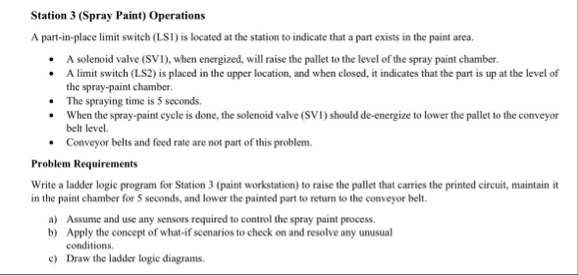 Station 3 (Spray Paint) Operations
parti plce lit switch (1) oct a he station dict ht a prt xs in he pao ara
«+ Asoenoid valve (V1), when energized. will ase the pallet othe evel ofthe spay pai chamber
«A limit switch (LS2 is placed in the upp locaton, and when cose, ccat that he prt i at the el of
be spray-pin chamber
«Th spraying ime is sconds.
+ When he spry-pin yee s dom, the slid ave (SV1) should dence to lower he ple tothe conveyor
betlevl
«Conveyor belts and od rt are mot part ofthis roe.
Problem Requirements
Write oder logic program for Sion 3 (past workstation) rise the pallet ht caries te pened cru, ma it
nthe paint chamber for scons, ad lowe he painted pr etm 1 the conveyor bl,
9) Aste nd se any scons ruined 1 contol he spray pain proces.
5) Apply he concept of what ecnarios chock on nd esol ny unusual
condition
©) Draw he ladder ogc digras.
Station 3 (Spray Paint) Operations
parti plce lit switch (1) oct a he station dict ht a prt xs in he pao ara
«+ Asoenoid valve (V1), when energized. will ase the pallet othe evel ofthe spay pai chamber
«A limit switch (LS2 is placed in the upp locaton, and when cose, ccat that he prt i at the el of
be spray-pin chamber
«Th spraying ime is sconds.
+ When he spry-pin yee s dom, the slid ave (SV1) should dence to lower he ple tothe conveyor
betlevl
«Conveyor belts and od rt are mot part ofthis roe.
Problem Requirements
Write oder logic program for Sion 3 (past workstation) rise the pallet ht caries te pened cru, ma it
nthe paint chamber for scons, ad lowe he painted pr etm 1 the conveyor bl,
9) Aste nd se any scons ruined 1 contol he spray pain proces.
5) Apply he concept of what ecnarios chock on nd esol ny unusual
condition
©) Draw he ladder ogc digras.