 VIPSolutions
Act like a helpful tutor and exlain me : Calculate, using SLOPE command, betas for each project, portfolio of projects and the peer group for the following periods: 1 . Full period 2 0 0 7 - 2 0 2 5 2 . Ex - crises 2 0 0 7 - 2 0 2 5 Discuss betas and compare them across periods, projects, and vis a vis peersAssume: a company has a portfolio of five investment projects Project1 Project2 Project3 Projectd Project5 Portfolio of all 5 pPeer Group Market 2007 7.00% 4.15% 12.00% 17.75% -10.50% 9.35% -3.00% 2008 -3.45% 354% 11.35% 18.25% 5.50% 9.27% 4.20% 2009 7.85% 5.50% 7.75% 7.60% 7.75% 9.35% 5.75% 2000 8.37% 8.05% 7.33% 12.55% 11.22% 9.87% 4.50% 2011 9.05% 10.15% 10.27% 843% 10.65% 10.95% 7.10% 2012 7.23% -3.30% 7.33% 9.64% 5.35% 10.05% 6.17% 2013 9.47% 9.93% 257% 11.05% 2.22% 8.75% 3.19% 2014 10.55% 3.33% 290% 10.90% 11.21% 8.30% 4.30% 2015 12.27% 10.60% 2.53% 830% 15.00% 6.33% 4.22% 2016 13.52% 9.50% 6.20% 7.25% 12.00% 7.70% 5.70% 2017 8.30% 9.22% 8.05% 6.75% 9.37% 8.90% 2.55% 2018 11.33% 8.60% 7.30% 8.87% 3.37% 7.35% 2.47% 2019 15.24% 7.95% 2.21% 9.33% 3.30% 6.25% 2.15% 2020 3.35% 5.10% 6.35% 7.27% 8.15% 6.44% -3.50% 2021 12.00% 11.00% 27.00% 7.35% 11.05% 3.73% 6.05% 2022 16.50% 7.50% 7.20% 24.70% 10.75% 11.30% 0.71% 2023 18.30% 11.25% 7.23% 25.45% 12.80% 9.65% 12.95% 2024 16.22% 12.37% 659% 18.39% 8.63% 10.34% 21.30% 2025 18.30% 1150% 22.86% 455% 11.47% 12.50% 18.75% Portfolio weights: 18.0% 15.0% 22.0% 27.0% 18.0%
Question:
Act like a helpful tutor and exlain me :
Calculate, using SLOPE command, betas for each project, portfolio of projects and the peer group for the following periods:
1
.
Full period
2
0
0
7
-
2
0
2
5
2
.
Ex
-
crises
2
0
0
7
-
2
0
2
5
Discuss betas and compare them across periods, projects, and vis a vis peers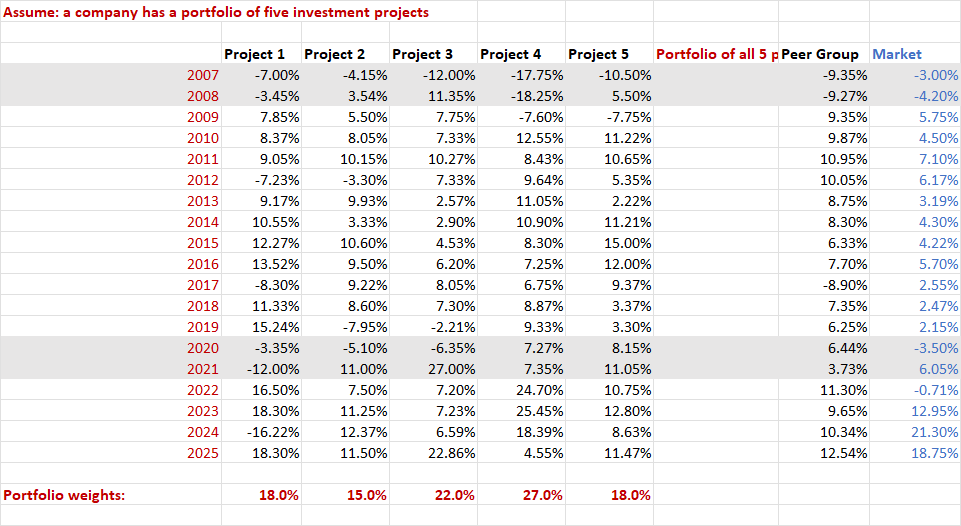 Assume: a company has a portfolio of five investment projects
Project1 Project2 Project3 Projectd Project5 Portfolio of all 5 pPeer Group Market
2007 7.00% 4.15% 12.00% 17.75% -10.50% 9.35% -3.00%
2008 -3.45% 354% 11.35% 18.25% 5.50% 9.27% 4.20%
2009 7.85% 5.50% 7.75% 7.60% 7.75% 9.35% 5.75%
2000 8.37% 8.05% 7.33% 12.55% 11.22% 9.87% 4.50%
2011 9.05% 10.15% 10.27% 843% 10.65% 10.95% 7.10%
2012 7.23% -3.30% 7.33% 9.64% 5.35% 10.05% 6.17%
2013 9.47% 9.93% 257% 11.05% 2.22% 8.75% 3.19%
2014 10.55% 3.33% 290% 10.90% 11.21% 8.30% 4.30%
2015 12.27% 10.60% 2.53% 830% 15.00% 6.33% 4.22%
2016 13.52% 9.50% 6.20% 7.25% 12.00% 7.70% 5.70%
2017 8.30% 9.22% 8.05% 6.75% 9.37% 8.90% 2.55%
2018 11.33% 8.60% 7.30% 8.87% 3.37% 7.35% 2.47%
2019 15.24% 7.95% 2.21% 9.33% 3.30% 6.25% 2.15%
2020 3.35% 5.10% 6.35% 7.27% 8.15% 6.44% -3.50%
2021 12.00% 11.00% 27.00% 7.35% 11.05% 3.73% 6.05%
2022 16.50% 7.50% 7.20% 24.70% 10.75% 11.30% 0.71%
2023 18.30% 11.25% 7.23% 25.45% 12.80% 9.65% 12.95%
2024 16.22% 12.37% 659% 18.39% 8.63% 10.34% 21.30%
2025 18.30% 1150% 22.86% 455% 11.47% 12.50% 18.75%
Portfolio weights: 18.0% 15.0% 22.0% 27.0% 18.0%
Assume: a company has a portfolio of five investment projects
Project1 Project2 Project3 Projectd Project5 Portfolio of all 5 pPeer Group Market
2007 7.00% 4.15% 12.00% 17.75% -10.50% 9.35% -3.00%
2008 -3.45% 354% 11.35% 18.25% 5.50% 9.27% 4.20%
2009 7.85% 5.50% 7.75% 7.60% 7.75% 9.35% 5.75%
2000 8.37% 8.05% 7.33% 12.55% 11.22% 9.87% 4.50%
2011 9.05% 10.15% 10.27% 843% 10.65% 10.95% 7.10%
2012 7.23% -3.30% 7.33% 9.64% 5.35% 10.05% 6.17%
2013 9.47% 9.93% 257% 11.05% 2.22% 8.75% 3.19%
2014 10.55% 3.33% 290% 10.90% 11.21% 8.30% 4.30%
2015 12.27% 10.60% 2.53% 830% 15.00% 6.33% 4.22%
2016 13.52% 9.50% 6.20% 7.25% 12.00% 7.70% 5.70%
2017 8.30% 9.22% 8.05% 6.75% 9.37% 8.90% 2.55%
2018 11.33% 8.60% 7.30% 8.87% 3.37% 7.35% 2.47%
2019 15.24% 7.95% 2.21% 9.33% 3.30% 6.25% 2.15%
2020 3.35% 5.10% 6.35% 7.27% 8.15% 6.44% -3.50%
2021 12.00% 11.00% 27.00% 7.35% 11.05% 3.73% 6.05%
2022 16.50% 7.50% 7.20% 24.70% 10.75% 11.30% 0.71%
2023 18.30% 11.25% 7.23% 25.45% 12.80% 9.65% 12.95%
2024 16.22% 12.37% 659% 18.39% 8.63% 10.34% 21.30%
2025 18.30% 1150% 22.86% 455% 11.47% 12.50% 18.75%
Portfolio weights: 18.0% 15.0% 22.0% 27.0% 18.0%
Asked by: Alok Kumar
Created at: 2026-02-02 06:05:33
Final Answer:
📢 Instructions:
- Ask anything relatd to above question only.
- For new Question goto :